
The Complete Guide to Accounting Software for Staffing and Recruiting Firms: What to Use, How to Set It Up, and How to Stop Reconciling by Hand

Key Takeaways
- The right accounting software for a staffing firm isn't about replacing QuickBooks or Xero. It's about connecting your ATS and placement data so you stop re-entering the same numbers twice.
- Commission calculations and invoice generation are the two biggest manual bottlenecks for recruiting firm owners, and both can be automated with the right stack.
- Most firms need a three-layer approach: a core accounting platform (QuickBooks, Xero, or similar), a payroll tool (Rippling or Gusto), and a cash flow and invoicing layer purpose-built for recruiting.
- Accounts receivable is the silent killer of recruiting firm cash flow. Many firms carry 30–60 days of outstanding invoices and don't realize it until payroll is tight.
- You don't need to rip out your current tools. The goal is to eliminate the manual handoffs between them.
It's 10:47 PM on a Tuesday. You just closed a placement, you have two more in the pipeline, and instead of celebrating you're opening a spreadsheet to figure out what you're actually owed, when you're going to get paid, and whether the commission split for your senior recruiter is right. Sound familiar?
This is the most common financial pain point for recruiting firm owners: not the invoicing itself, but the gap between where your placement data lives (usually an ATS like Bullhorn, Crelate, or JobAdder) and where your financials live (usually QuickBooks, Xero, or a spreadsheet that's gotten out of hand). That gap is where the manual work happens. That gap is what this guide is designed to close.
This is the definitive guide to accounting software for staffing firms: what to use, how to configure it for the way recruiting firms actually bill, and how to stop doing by hand what should have been automated two years ago.
Why Accounting Software for Staffing Firms Is Different from Standard Business Accounting
Standard small-business accounting software is built for product sales or simple service retainers. Staffing and recruiting firms don't fit either model cleanly. Your revenue is event-driven (a placement happens, an invoice gets triggered), often conditional (guarantee clauses, replacement periods, falloff risk), and tied to individual people and roles in ways that general-purpose tools don't track natively.
Here's what makes recruiting firm accounting genuinely different:
- Contingency fee structures mean your revenue isn't recognized until a candidate starts, and sometimes not until a guarantee period passes without a falloff, creating timing complexity that QuickBooks doesn't handle out of the box.
- Split placements and commission sharing between recruiters, account managers, or partner firms require tracking the same invoice across multiple internal payees, which general-purpose accounting software treats as a single transaction.
- Temp and contract staffing adds payroll co-employment complexity, weekly billing cycles, markup calculations, and workers' comp tracking that permanent placement firms don't have, but many firms do both.
- Multiple fee agreements with different clients (some net-15, some net-30, some retainer-based) mean your AR aging isn't one-size-fits-all, and chasing payments requires knowing which contract terms apply to each invoice.
- Cash flow irregularity is structural, not accidental: a great placement month doesn't mean a great cash month if all your invoices are on net-45 terms.
You need accounting infrastructure that understands how recruiting revenue actually works, not just how to categorize expenses and generate a P&L.
The Core Accounting Software Stack for a Recruiting Firm
The best accounting setup for a staffing firm is not a single tool. It's a deliberate three-layer stack. Each layer handles a different job, and the goal is to make those layers talk to each other so data flows automatically instead of being re-entered manually.
Layer 1: Your Core Accounting Platform (QuickBooks, Xero, or FreshBooks)
Your core accounting platform is the system of record for your financials. This is where your chart of accounts lives, where tax prep happens, and where your bookkeeper or CPA works. For most recruiting firms, this means one of three tools:
QuickBooks Online
QuickBooks Online is the dominant choice for U.S.-based recruiting firms, largely because it's what most bookkeepers and CPAs already know. It handles invoicing, expense tracking, bank reconciliation, and basic reporting. Its biggest limitation for recruiting firms is that it has no native connection to ATS platforms, so placement data must be entered manually or synced via a third-party integration.
Xero
Xero is popular with firms that have international placements or work with bookkeepers in the UK, Australia, or Canada. Its open API and strong integration ecosystem make it more flexible than QuickBooks for custom workflows. Many firms running a more modern, automated stack prefer Xero for this reason.
FreshBooks
FreshBooks works well for solo recruiters and very small boutique firms (one to three people), but it tends to hit its limits as you scale past a handful of active clients. The reporting and multi-user functionality aren't as deep as QuickBooks or Xero for firms doing meaningful volume.
The right choice at Layer 1 is usually whatever your bookkeeper or CPA already uses. Don't switch your accounting platform just to solve a workflow problem. Solve the workflow problem with the layers above and below it.
Layer 2: Payroll (Rippling, Gusto, or ADP)
Payroll is its own category, and for recruiting firms it's more complex than for most small businesses because you're often paying both W-2 employees (your internal team) and contractors or temp workers placed with clients.
Gusto is the most popular choice for small to mid-size recruiting firms running internal payroll. It's intuitive, integrates cleanly with QuickBooks and Xero, and handles contractor payments alongside W-2 payroll without requiring a separate system.
Rippling goes further. It's an HR and payroll platform that also handles benefits, device management, and onboarding. For firms growing their internal team or managing a mix of full-time employees and placed contractors, Rippling's tighter integration between HR records and payroll is genuinely valuable.
ADP is typically the choice for larger staffing agencies with temp workforces in the dozens or hundreds, where the compliance and tax filing complexity warrants the added cost and complexity of enterprise payroll infrastructure.
Layer 3: Invoicing, AR, and Cash Flow Intelligence
This is the layer most recruiting firms are missing, and the one that creates the most manual work when it's absent. Layer 3 is where placement data gets turned into invoices automatically, where AR aging gets tracked in the context of your pipeline, and where commission calculations happen without a spreadsheet.
General-purpose tools like QuickBooks can technically handle invoicing, but they don't know anything about your placements. They don't know a net-30 invoice was issued for a $24,000 placement fee on a 20% contingency deal with a 90-day guarantee. They just know an invoice exists. The intelligence about why the invoice exists and what to do if it goes past due lives in a spreadsheet on someone's desktop.
Purpose-built tools for recruiting firm cash flow and invoice automation, like CollectedHQ, connect to your ATS and your accounting platform to close this gap. When a placement is logged, an invoice is generated automatically with the correct fee, terms, and client details pulled from the placement record. AR follow-up sequences can be triggered by due date. Commission splits are calculated and recorded without anyone doing math by hand.
How to Set Up QuickBooks for a Staffing or Recruiting Firm
If you're using QuickBooks Online as your core accounting platform, which most U.S. firms are, the default setup is not optimized for recruiting. Here's how to configure it properly.
Build a Chart of Accounts That Reflects Recruiting Revenue
QuickBooks' default chart of accounts is generic. For a recruiting firm, you want income accounts that separate your revenue by type so you can see what's actually driving your business. At minimum, create separate income accounts for:
- Permanent placement fees (contingency)
- Retained search fees
- Contract and temp staffing revenue
- Consulting or project-based fees (if applicable)
This isn't just a bookkeeping preference. It's the difference between a P&L that tells you something and one that just confirms you made money.
Set Up Customers and Service Items Correctly
In QuickBooks, each client should be set up as a Customer with their billing terms, primary contact, and any notes about their payment history. Each type of fee you charge should be a Service Item in your Products & Services list, mapped to the correct income account. When you create an invoice, you're selecting a customer and a service item. This is what drives accurate revenue reporting.
Use Invoice Templates That Reduce Back-and-Forth
Many recruiting firms get paid slower than they should because their invoices are confusing or missing information. A good recruiting invoice template includes the candidate name, role, start date, fee basis (percentage of salary or flat fee), the salary it's calculated on, payment terms, and wire/ACH instructions. Clients who receive an unclear invoice will delay payment while they internally sort out what they're approving.
Connect Your Bank and Credit Card Accounts
This sounds obvious, but a surprising number of recruiting firm owners are still manually entering transactions. Connect your business checking, savings, and credit card accounts to QuickBooks for automated transaction import. Then set up bank rules to auto-categorize recurring transactions: your monthly software subscriptions, office expenses, and contractor payments should never need to be manually categorized after the first time.
The QuickBooks-ATS Gap (And How to Bridge It)
Here's the honest limitation: even a perfectly configured QuickBooks setup doesn't solve the core problem of manually entering placement data. Every time you close a deal, someone still has to open QuickBooks, create a new invoice, enter the client, the candidate, the fee, and the terms. If that's happening for every placement, you're spending real hours every month on data entry that could be eliminated.
Bridging this gap requires either a direct integration between your ATS and QuickBooks (available via tools like Zapier or native integrations in some ATS platforms), or a dedicated recruiting finance layer that handles the translation. Either way, the goal is the same: a placement gets logged once, and the invoice gets created automatically.
Commission Tracking and Calculation for Recruiting Firms
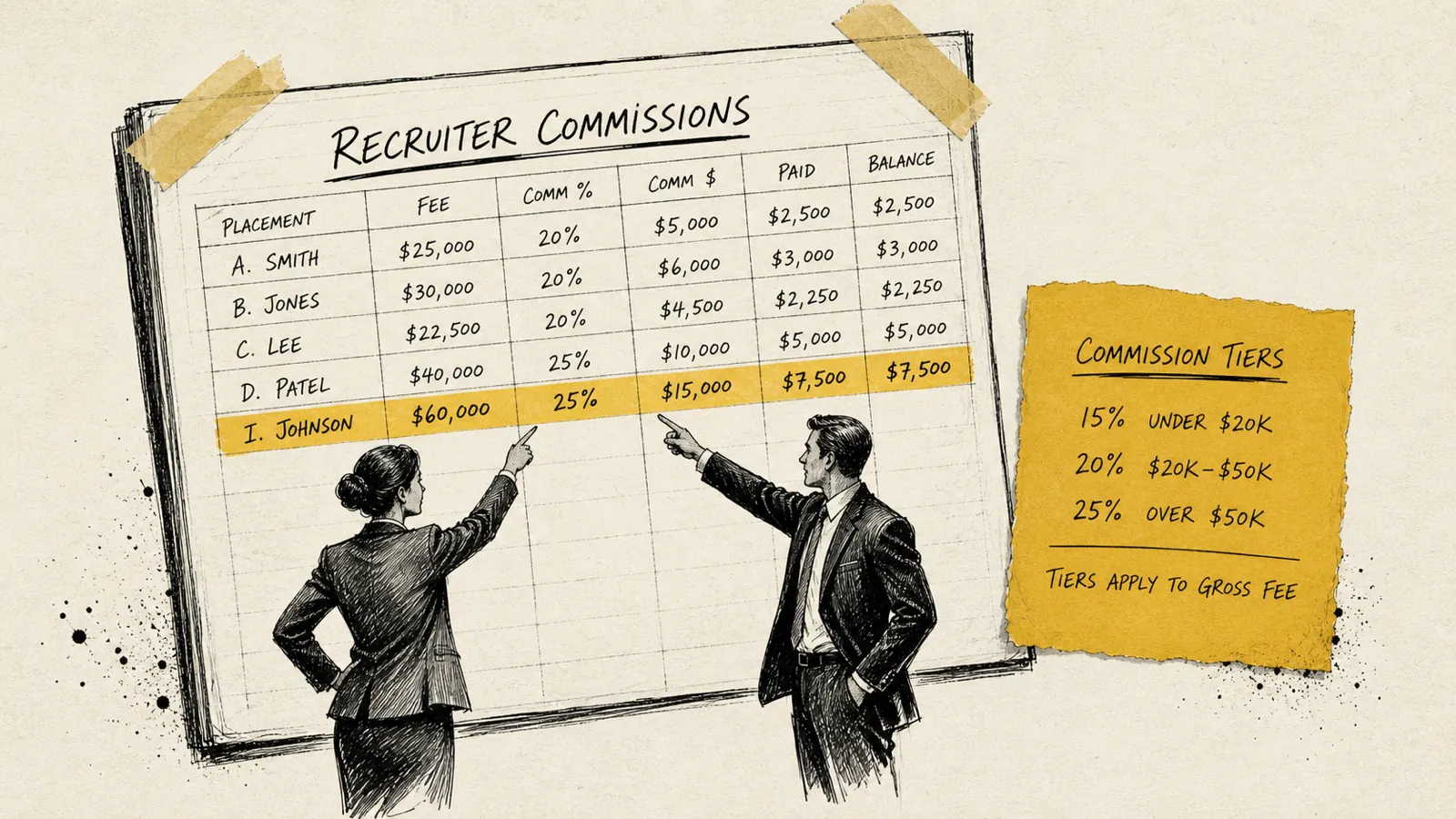
Commission tracking is where the most spreadsheet debt accumulates in recruiting firms. The manual process typically looks like this: someone exports a list of closed placements from the ATS, cross-references it against invoices in QuickBooks or a separate spreadsheet, calculates commission based on each recruiter's current agreement, checks whether the invoice has been paid (because most firms only pay commissions on collected revenue), and then prepares a commission run. This process is done monthly, takes hours, and is prone to errors that erode recruiter trust.
The Three Variables That Make Commission Calculations Complex
- Tiered structures: many recruiting firms pay a base commission rate up to a certain revenue threshold and a higher rate above it, which means commission calculations depend on where the recruiter is in their target for the month or quarter.
- Split placements: when a recruiter and an account manager both get credit, or when two recruiters collaborate on a placement, the fee must be split according to a predefined formula, then each person's split is subject to their individual commission rate.
- Cash-basis vs. accrual-basis commissions: most recruiting firms pay commissions only when the invoice is collected, not when it's issued. This means your commission calculation has to account for payment timing, falloffs, and replacements.
How to Stop Tracking Commissions in Spreadsheets
The path out of spreadsheet-based commission tracking runs through your accounting and invoicing infrastructure. When your invoicing layer knows who originated a placement, what the fee was, and when it was collected, commission calculations can be automated. The key steps are:
- Define all commission structures in writing, with clear rules for splits, tiers, and cash-basis collection requirements.
- Ensure every placement in your ATS is tagged with the originating recruiter and account manager, with split percentages recorded at the time of placement, not retroactively.
- Connect your ATS placement data to your invoicing layer so collection events trigger automatic commission calculations.
- Push calculated commission amounts to your payroll tool (Gusto, Rippling) so they're included in the correct payroll run without manual entry.
When this pipeline is working, commission calculations go from a multi-hour monthly exercise to a report you review for two minutes before approving payroll.
Accounts Receivable Management for Staffing Agencies
Accounts receivable is the silent cash flow killer for recruiting firms. Many firms carry 30 to 60 days of outstanding invoices as a structural reality, but the firms that actively manage AR, with systematic follow-up, clear escalation paths, and real-time visibility into aging, collect meaningfully faster and experience fewer cash crunches.
What Good AR Management Looks Like
The basic AR process for a recruiting firm should include an automated payment reminder sent a few days before an invoice is due, a follow-up email on the due date if the invoice is unpaid, a second follow-up one week after the due date, and a phone or personal outreach from the account manager at two weeks past due. Beyond that, firms should have a written policy for when invoices go to collections or legal review.
Most firms have this process in their heads. Very few have it running automatically.
AR Aging Reports: What to Review Weekly
An AR aging report shows you every outstanding invoice grouped by how far past due it is: current, 1–30 days, 31–60 days, 61–90 days, and 90+ days. This is the single most important financial report for a recruiting firm owner to review weekly. If you're not looking at this every week, you will have late payments sneak up on you.
In QuickBooks, you can pull this report under Reports > Accounts Receivable Aging. In Xero, it's under Reports > Aged Receivables. The key discipline is acting on what you see: assigning every invoice in the 31–60 bucket to someone who will follow up that day.
The Guarantee Clause Problem
Permanent placement firms often offer 30, 60, or 90-day replacement guarantees if a placed candidate leaves. This creates a contingent liability that standard AR management doesn't account for. A client may delay payment specifically because they're waiting out a guarantee period, and you need to know whether that delay is legitimate or just slow-paying behavior. Tracking guarantee expiration dates alongside invoice due dates is essential for firms with any volume of contingency placements.
Temporary and Contract Staffing: Additional Accounting Complexity
If your firm places temporary or contract workers, your accounting complexity increases significantly. Temp staffing adds a weekly billing cycle (versus the single-invoice model of permanent placement), payroll co-employment obligations, markup calculations, workers' compensation tracking, and in some states, sick leave accrual requirements for placed workers.
The Markup Model and How to Track It
In temp staffing, you pay the worker a pay rate and charge the client a higher bill rate, and the difference is your markup. Tracking margin per placement, not just revenue, requires knowing both the bill rate and the pay rate for every worker, and ensuring your accounting system can report gross margin by client or by placement type. This is where general-purpose accounting software struggles most: it can record the revenue, but it doesn't inherently understand the cost structure of a temp placement.
Weekly Billing and Timesheet Integration
Temp placements are billed weekly based on approved timesheets, which means your invoicing process runs on a weekly cycle with dozens or hundreds of line items. This is operationally unsustainable without automation. Tools like Bullhorn, TempWorks, or TargetRecruit handle timesheet collection and can push approved hours to your accounting platform, but the integration needs to be configured correctly or you'll end up with mismatches between billed hours and recorded timesheets.
Choosing Between QuickBooks and Xero for Your Staffing Firm
Both QuickBooks Online and Xero are capable accounting platforms for recruiting firms. The right choice depends on your situation, not on which one has better marketing. Here's a direct comparison using the criteria that matter most for staffing and recruiting operations:
Bookkeeper and CPA familiarity
QuickBooks is the dominant platform in the U.S. The majority of bookkeepers and CPAs are most comfortable in QBO. If you're working with a U.S.-based finance professional, they've almost certainly already used QuickBooks. This is the single biggest practical reason most U.S. firms default to it.
Integration ecosystem
Xero has a more open API and a reputation for cleaner integrations with modern SaaS tools. If you're building an automated stack and want to connect multiple tools, Xero tends to be more flexible. QuickBooks has improved significantly in this area, but Xero still has an edge for API-first workflows.
Multi-currency support
Xero handles multi-currency invoicing more cleanly than QuickBooks for firms that place internationally or invoice clients in non-USD currencies. QuickBooks supports multi-currency but it's an add-on and the UX is less intuitive.
Reporting depth
QuickBooks has more detailed built-in reporting for U.S.-based businesses, with better support for job costing and class tracking, both of which are useful for recruiting firms tracking revenue by division, practice area, or recruiter. Xero's reporting is improving but still lags behind QBO for complex financial reporting without a third-party add-on.
The honest answer: If you're already using QuickBooks and your bookkeeper knows it, don't switch. Configure it better, add the right integration layer, and fix the workflow problem that's actually bothering you. If you're starting fresh or already running a modern, API-connected stack, Xero is worth a serious look.
How Rippling and Gusto Fit Into a Recruiting Firm's Finance Stack
Payroll tools are often treated as a back-office commodity, but for recruiting firms they sit at a critical intersection: they're where your internal team's compensation runs, where contractor payments get processed, and, if you do temp staffing, where placed workers may be co-employed.
Gusto for recruiting firms works best for firms with a straightforward internal payroll situation: W-2 employees plus some 1099 contractors, all in a small number of states. Gusto's onboarding is fast, the integration with QuickBooks is clean, and the pricing is predictable. Many boutique and mid-size recruiting firms run on Gusto without issue. The limitation shows up if you're doing high-volume temp staffing across multiple states, where the compliance complexity calls for a platform built for it.
Rippling for recruiting firms adds HR functionality on top of payroll: benefits administration, equipment management, onboarding workflows, and app provisioning. For a recruiting firm that's growing its internal headcount, Rippling's tight loop between an employee record and payroll reduces the administrative overhead of onboarding new recruiters. It also integrates with more HR and workforce tools than Gusto, which matters if you're building out a more sophisticated people operations function.
Both Gusto and Rippling integrate directly with QuickBooks and Xero, syncing payroll journal entries automatically so you don't have to manually enter payroll runs into your accounting platform. If you're currently doing that manually, turning on that integration is one of the fastest wins available in your finance stack.
Building Your Recruiting Firm Finance Stack: A Practical Roadmap
Firms frustrated with their financial operations usually lack a deliberate architecture. Here's how to build one without burning it all down.
Step 1: Audit What You Have and Where the Manual Work Actually Lives
Before you add anything, spend one hour documenting every financial task you or your office manager does manually each month. List the task, how long it takes, and what triggers it. This audit will almost always reveal that two or three tasks account for the majority of the time: usually invoice creation, commission calculation, and AR follow-up. Those are your highest-value automation targets.
Step 2: Configure Your Existing Tools Properly Before Adding New Ones
Most recruiting firms are under-using the tools they already pay for. Before adding another subscription, make sure QuickBooks (or Xero) has the right chart of accounts, your bank feeds are connected, your invoice templates are complete, and your payroll integration is turned on. These configuration steps are free and often eliminate a meaningful amount of manual work by themselves.
Step 3: Connect Your ATS to Your Invoicing Layer
This is the integration that matters most for a permanent placement firm. When a placement is logged in your ATS, an invoice should be created automatically in your accounting platform with the correct client, fee, and terms. If your ATS and accounting platform don't have a native integration, tools like Zapier, Make (formerly Integromat), or a purpose-built recruiting finance platform can handle this translation.
Step 4: Automate AR Follow-Up
Once invoices are being created automatically, the next step is automating the follow-up sequence. Most accounting platforms support basic invoice reminders, but they're often turned off by default or not configured with the right timing and messaging for recruiting. Set up a sequence that sends a reminder three days before due, on the due date, and at one week and two weeks past due. Review and customize the messaging so it sounds like it came from your firm, not from software.
Step 5: Automate Commission Calculations
Once AR is flowing cleanly, commission automation becomes tractable. With a clear picture of which invoices have been collected, which placements they correspond to, and which recruiters originated them, the math is straightforward. It just needs a system to run it. This is where a dedicated recruiting finance tool earns its cost: not in replacing QuickBooks, but in handling the intelligence layer that QuickBooks wasn't built for.
Common Mistakes Recruiting Firms Make With Their Accounting Setup
These errors show up at every size, from solo recruiters to agencies placing hundreds of people per year.
- Using a single income account for all revenue: when all your revenue flows into one line, you can't see whether your permanent placement business is growing while your contract business is shrinking, or which practice area is actually profitable after commissions and overhead.
- Not invoicing immediately upon placement: every day between when a candidate starts and when you send an invoice is a day added to your collection timeline. Invoice on the start date, every time, automatically if possible.
- Paying commissions before collecting the invoice: this creates a cash flow problem that compounds over time, especially if you have any meaningful falloff rate. Pay commissions on collected revenue, not on billed revenue, and make sure your recruiters understand this from day one.
- Ignoring the AR aging report until it's a crisis: firms that don't review AR weekly tend to discover slow-paying clients when they're three or four months past due, at which point collection is materially harder. Weekly AR review is non-negotiable.
- Treating the accounting platform as the source of truth for placement data: QuickBooks doesn't know anything about your placements; your ATS does. If you're using QuickBooks as your placement tracker because it's convenient, you're creating data integrity problems that will surface at the worst possible time.
Frequently Asked Questions About Accounting Software for Staffing Firms
What is the best accounting software for a staffing firm?
The best accounting software for a staffing firm is a connected stack, not a single tool. Most firms use QuickBooks Online or Xero as their core accounting platform, Gusto or Rippling for payroll, and a purpose-built invoicing and cash flow layer to connect placement data from the ATS to the accounting platform. The best individual platform depends on your firm's size, geographic footprint, and existing tool preferences.
Can QuickBooks handle staffing firm invoicing?
QuickBooks can generate and send invoices, track payment status, and report on AR aging. What it cannot do natively is pull placement data from your ATS to create those invoices automatically. Most recruiting firms using QuickBooks are creating invoices manually, which is the core inefficiency. Bridging this gap requires either a native ATS integration or a third-party automation layer.
How do recruiting firms track commissions in accounting software?
Most recruiting firms track commissions in spreadsheets because their accounting software doesn't have the context to calculate them. The right approach is to connect placement data, fee agreements, and payment records in a single system that can apply commission rules automatically. Purpose-built recruiting finance tools or well-configured integrations between your ATS, accounting platform, and payroll tool can eliminate the spreadsheet entirely.
Should a recruiting firm use cash or accrual accounting?
Most small to mid-size recruiting firms use cash-basis accounting because it more accurately reflects actual cash position, which is the number that matters most for operational decisions. As firms scale, particularly those with significant temp staffing volume or retained search agreements, accrual accounting gives a more accurate picture of revenue recognized versus revenue collected. Consult your CPA on which basis is right for your firm's size and structure.
How do I reduce accounts receivable days at my recruiting firm?
Reducing AR days at a recruiting firm requires three changes working together: invoicing immediately upon placement (not days or weeks later), running an automated follow-up sequence for unpaid invoices, and reviewing AR aging every week so nothing sits in the 31–60 day bucket without active follow-up. Firms that implement all three consistently collect meaningfully faster than those relying on ad-hoc follow-up.
You Don't Need New Tools. You Need a Connected Stack
The goal of this guide is not to convince you to rip out QuickBooks and start over. QuickBooks is fine. Xero is fine. Gusto and Rippling are fine. The problem isn't any individual tool. It's the space between them, where a placement gets closed in your ATS and someone has to manually carry that data into an invoice, then into a commission spreadsheet, then into a payroll run.
Every one of those manual handoffs is a place where errors accumulate, hours disappear, and late-night reconciliation sessions happen. Fixing that doesn't require a new accounting platform. It requires deliberate architecture: a clear-eyed look at where the manual work actually lives, and a systematic plan to automate the handoffs that are eating your time.
Start with your biggest friction point. For most recruiting firm owners, that's either invoice creation from placement data or commission calculation at month-end. Pick one, automate it, and you'll free up enough time and mental energy to tackle the next one. Within a quarter, the version of you who was reconciling books at midnight will feel like a different person.

Never sweat invoicing or commissions again.