
QuickBooks for Recruiting Agencies: The Complete Setup Guide to Chart of Accounts, Invoicing, Commissions, and ATS Integration

Key Takeaways
- QuickBooks can work well for recruiting agencies, but requires a recruiting-specific chart of accounts to accurately track placement fees, contingency revenue, retained revenue, and temp/contract margins separately.
- Commission calculations should never live in a spreadsheet disconnected from your QuickBooks invoices. Reconciliation errors compound quickly and cost you money at tax time and during audits.
- Connecting your ATS (Bullhorn, JobAdder, Crelate, etc.) to QuickBooks via a middleware integration or native connector eliminates the most common source of manual data entry errors for recruiting firms.
- If your firm bills on both contingency and retained search models, you need separate revenue accounts and deferred revenue tracking. QuickBooks supports this out of the box if configured correctly.
Here's a scenario that plays out in way too many recruiting firms: It's 10:30 PM, the office is quiet, and the owner or office manager is cross-referencing a spreadsheet of placements against a QuickBooks invoice list, trying to figure out why the numbers don't match. Again. The ATS says one thing, the commission log says another, and QuickBooks is living in its own reality entirely.
If that sounds familiar, this guide is for you.
Using QuickBooks for a recruiting agency is the right call for most firms. You don't need to rip out your accounting system and start over. What you need is a proper setup: the right chart of accounts, a clean invoicing workflow, a commission tracking method that doesn't rely on memory or luck, and ideally a direct connection between your ATS and your books. This guide covers all of it.
Why QuickBooks Is a Legitimate Choice for Recruiting Firms (And What It Can't Do Alone)
QuickBooks Online is the default accounting platform for small and mid-sized businesses across industries, and recruiting is no exception. It handles accounts receivable, bank reconciliation, payroll integration, tax preparation support, and financial reporting well enough for the vast majority of recruiting agencies.
The problem isn't QuickBooks itself. The problem is that QuickBooks is a general-purpose accounting tool, and recruiting firms have highly specific financial workflows that most general setups don't account for. Literally.
Here's what QuickBooks handles well for recruiting agencies:
- Sending and tracking placement fee invoices with net payment terms
- Recording and categorizing expenses like job boards, LinkedIn Recruiter, and sourcing tools
- Connecting to bank accounts and credit cards for automatic transaction import
- Generating P&L reports, balance sheets, and cash flow statements
- Integrating with payroll providers like Gusto or Rippling for recruiter compensation
- Supporting your accountant or bookkeeper with shared access and audit trails
Here's what QuickBooks can't do without proper configuration or supplemental tools:
- Automatically calculate split commissions across multiple recruiters on a single placement
- Pull placement data directly from your ATS without manual re-entry or a middleware connector
- Track deferred revenue on retained search retainers across multiple milestone payments
- Enforce the distinction between contingency revenue and retained revenue in your reporting
- Flag when an invoice has been paid but the corresponding commission hasn't been processed yet
The good news: every one of those gaps is solvable. Let's work through them methodically.
Building a Recruiting-Specific Chart of Accounts in QuickBooks
The chart of accounts is the foundation of your entire QuickBooks setup, and it's where most recruiting firms go wrong from day one. A generic chart of accounts (the kind QuickBooks generates automatically when you set up a new company) won't give you the visibility you need into how your firm actually makes money.
A recruiting agency's chart of accounts should separate revenue by delivery model, track commission expense accurately, and capture the cost of sourcing and placement operations distinctly from general overhead.
Revenue Accounts
Set up separate income accounts for each revenue type your firm generates. Mixing these together is one of the most common mistakes recruiting firm owners make, and it makes it nearly impossible to understand which part of your business is performing.
- Contingency Placement Fees: Revenue recognized when a placed candidate starts (or when invoice terms are met), billed as a percentage of first-year salary, typically 15–25%.
- Retained Search Fees: Revenue from engagements where the client pays upfront or in milestones; requires deferred revenue handling until earned milestones are reached.
- Contract/Temp Staffing Revenue: Gross billing for contract placements; if you're operating on a spread margin, you'll want a corresponding cost-of-revenue account for contractor pay.
- Temp-to-Perm Conversion Fees: Conversion fees when a contract worker converts to a full-time hire; these are often flat fees or calculated as a percentage and should be tracked separately from contingency fees.
- Consulting or RPO Revenue: If your firm offers recruitment process outsourcing or embedded recruiting services billed on a retainer or hourly basis, this needs its own account.
Deferred Revenue (Liability Account)
If you bill retained search clients in installments (for example, one-third at engagement, one-third at shortlist delivery, one-third at placement), you need a Deferred Revenue liability account. When a retainer payment hits your bank, it goes into this liability account first. As you earn it (hit milestones), you recognize it by moving it from deferred revenue into the appropriate income account.
QuickBooks Online supports this workflow with journal entries, though it requires discipline to maintain correctly. This is one area where a bookkeeper familiar with recruiting firm finances is worth every dollar.
Cost of Revenue Accounts
- Contractor Pay (Cost of Revenue): For staffing firms billing on a spread, the contractor's hourly wage and burden costs belong in cost of revenue, not operating expenses, so your gross margin is calculated correctly.
- Background Check and Assessment Costs: If your firm absorbs these costs on behalf of clients, track them in cost of revenue rather than general expenses.
Operating Expense Accounts
- Recruiter Commission Expense: A dedicated expense account for commission payments to internal recruiters; this should never be buried inside general salaries or wages.
- Job Board and Sourcing Costs: Indeed, LinkedIn Recruiter, ZipRecruiter, and similar tools belong here, separated from general software subscriptions.
- ATS and Recruiting Technology: Bullhorn, JobAdder, Crelate, Loxo, Vincere, or whichever ATS your firm uses; keeping this separate from general software helps you understand your technology cost per placement.
- Marketing and Business Development: Outbound campaigns, content marketing, conference sponsorships, and BD-related travel.
- Guarantee Reserve or Replacement Costs: If your firm honors placement guarantees (common in contingency search), consider tracking refunds or replacement-related costs in a dedicated account.
QuickBooks Invoicing for Placement Fees: Getting It Right
Placement fee invoicing in QuickBooks is straightforward once your chart of accounts is set up correctly, but there are a few recruiting-specific details that trip up a lot of firms.
Setting Up Products and Services for Placement Fees
In QuickBooks Online, every line item on an invoice is tied to a Product or Service. Create dedicated service items that map directly to your revenue accounts:
- Contingency Placement Fee: Mapped to your Contingency Placement Fees income account; use a description field that notes the placed candidate's name, role, and start date for clean records.
- Retained Search: Engagement Installment: Mapped to Deferred Revenue initially; you'll need a process to move this to earned revenue as milestones are hit.
- Retained Search: Completion Fee: Mapped to Retained Search Fees income account; this is the final milestone payment typically due at placement.
- Contract Staffing: Weekly Billing: Mapped to Contract/Temp Staffing Revenue; most firms set these up with a recurring invoice template in QuickBooks.
Invoice Terms and Late Fee Tracking
The standard net payment term for contingency placement fees is Net 30, though some firms use Net 15 for executive search or Net 45 for large enterprise clients. Set your default invoice terms in QuickBooks under Account Settings, and use custom terms per client where necessary.
QuickBooks Online supports automated payment reminders, which is one of its most underused features in recruiting firms. Set a reminder sequence: a friendly reminder at the due date, a follow-up at 7 days past due, and a firm notice at 21 days past due. Automating this alone can meaningfully reduce your average days sales outstanding (DSO) without anyone having to remember to send a follow-up email.
Tracking Placement Guarantees in QuickBooks
Most contingency recruiting firms offer placement guarantees, typically 30 to 90 days. If a placed candidate leaves during the guarantee period, you either refund the fee or provide a free replacement search. Both scenarios need to be tracked in QuickBooks:
- For fee refunds, issue a credit memo against the original invoice and record the refund payment; this keeps your revenue reporting accurate.
- For replacement searches provided at no charge, document the original invoice and the replacement with a $0 replacement invoice so you have a complete record of the obligation fulfilled.
- Consider a simple custom field on your QuickBooks customer records to track guarantee expiration dates so nothing falls through the cracks.
Commission Tracking for Recruiting Firms: The Right Way to Do It in QuickBooks
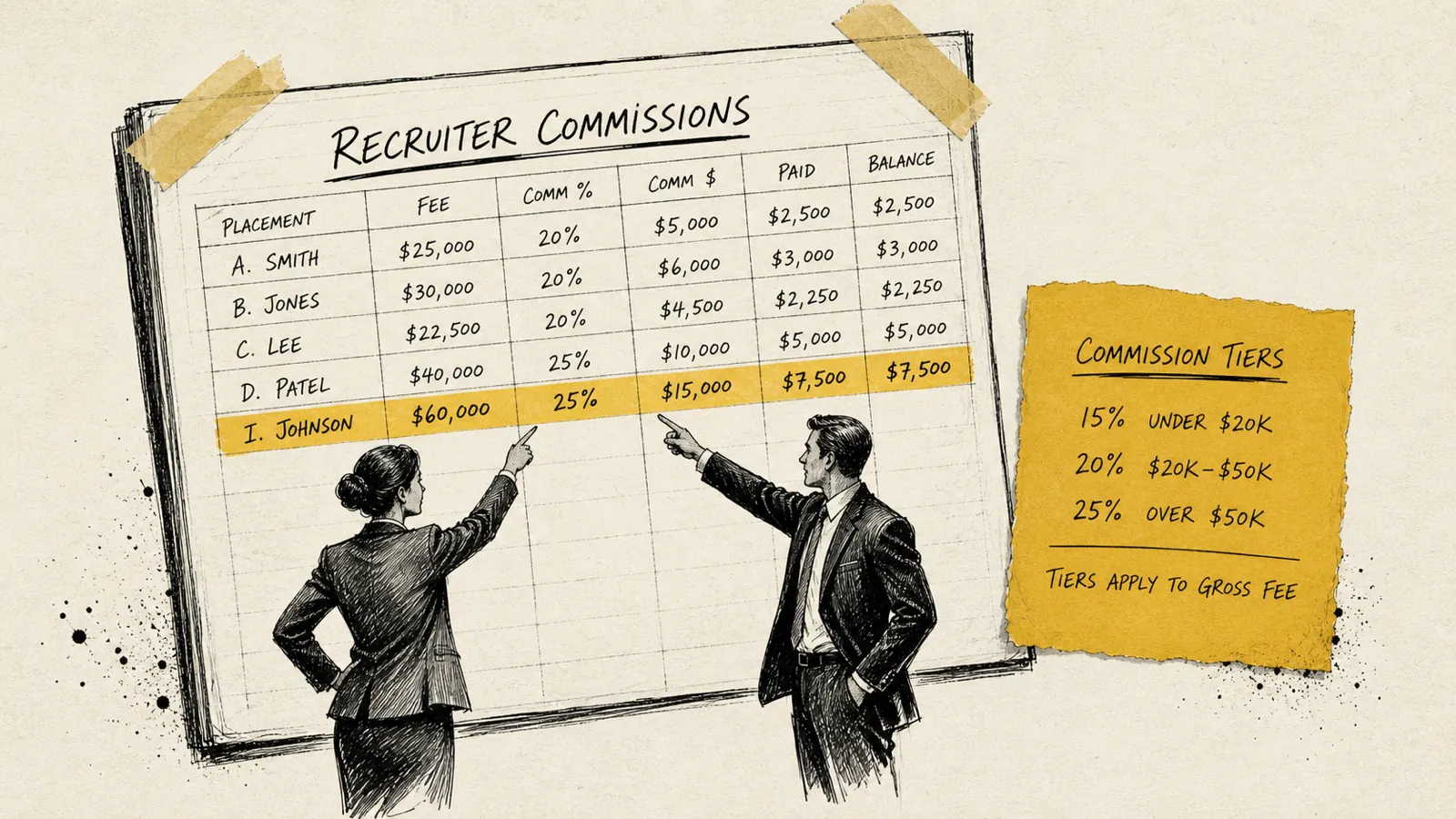
Commission tracking is where the late-night reconciliation nightmare usually lives. The typical workflow at firms that haven't solved this problem looks like: placement happens in the ATS, invoice goes out in QuickBooks, commission gets calculated in a spreadsheet, payment goes through payroll, and then someone has to manually verify that all three systems agree. They rarely do.
The right approach is to make QuickBooks the single source of truth for commission liability, with your commission logic feeding directly from invoice data.
Using Class Tracking for Recruiter Attribution
QuickBooks Online Plus and Advanced both support Class Tracking, which is the cleanest way to attribute revenue and commissions to individual recruiters or teams without creating a separate set of accounts for each person.
- Enable Class Tracking under Advanced Settings in QuickBooks and create a class for each recruiter (or desk/practice area if you prefer).
- When creating a placement invoice, assign the relevant class so that revenue is attributed to the placing recruiter in your reports.
- Run a Profit and Loss by Class report to see revenue per recruiter. This becomes your commission calculation starting point.
- If a placement involves a split between a business developer and a recruiter, QuickBooks allows you to split a single invoice line across two classes, giving each party their proportional credit.
Recording Commission Expense When It's Earned vs. When It's Paid
One of the most consequential decisions in your QuickBooks setup is whether you record commission expense when a placement invoice is issued (accrual basis) or when it's actually paid out (cash basis). Most recruiting firms operate on a cash basis for simplicity, but if you're billing retained retainers with milestone payments, accrual accounting gives you a more accurate picture.
Regardless of which you choose, commissions should be recorded as a liability (Commissions Payable) at the point they're earned and cleared when payment is processed through payroll or a contractor payment. This gives you a real-time view of your commission liability at any point in the month, something a spreadsheet never gives you cleanly.
When Spreadsheets Break Down
Spreadsheet-based commission tracking holds up while the plans are simple and the volume is low. As the plans get more complicated and the placements pile up, errors become inevitable: a formula gets broken, a row gets duplicated, or someone updates the wrong tab. The math looks right, but the underlying data is wrong, and you don't find out until someone disputes their commission check.
At that point, the right answer is a purpose-built commission tracking tool that integrates with QuickBooks, or a properly configured QuickBooks setup with automation rules that remove the human error vector entirely.
Connecting Your ATS to QuickBooks: Eliminating Manual Re-Entry
The single biggest source of bookkeeping errors in recruiting firms is manual data re-entry between the ATS and QuickBooks. A placement gets recorded in Bullhorn, someone manually creates an invoice in QuickBooks, and there's an immediate opportunity for a typo, a wrong percentage, a misattributed client, or simply forgetting to create the invoice at all.
The goal is a direct, automated data flow: placement confirmed in ATS → invoice auto-generated in QuickBooks → commission liability recorded → payment tracked and reconciled. Here's how to get there with the most common ATS platforms.
Bullhorn + QuickBooks Integration
Bullhorn is the dominant ATS in the staffing and recruiting space, and it has native integration capabilities with QuickBooks Online through its Bullhorn One or Bullhorn Back Office modules. The integration typically syncs client records, placement data, and invoices bidirectionally. If you're on Bullhorn and not using the QuickBooks connector, you're almost certainly doing manual data entry that you don't need to do.
For firms that find Bullhorn's native accounting integration too rigid, middleware tools like Zapier, Make (formerly Integromat), or dedicated recruiting finance platforms can create more flexible workflows that push specific placement fields into QuickBooks invoice line items.
JobAdder + QuickBooks Integration
JobAdder offers a native QuickBooks Online integration that syncs contacts, companies, and invoices. When a placement is finalized in JobAdder, the integration can automatically generate a draft invoice in QuickBooks mapped to the correct client and revenue account. Setup requires mapping JobAdder's fee structures to your QuickBooks Products and Services, which is a one-time configuration task that pays off immediately.
Crelate + QuickBooks Integration
Crelate connects to QuickBooks Online via its built-in integration or through Zapier for more customized workflows. The native connection handles contact and invoice sync; for commission attribution by recruiter, class tracking in QuickBooks needs to be mapped to the Crelate recruiter field in your integration setup.
Loxo, Vincere, and Other ATS Platforms
Most modern ATS platforms either have a direct QuickBooks integration or connect via a middleware layer. Before assuming you need to do manual data entry, check your ATS's integration marketplace or documentation. The connector you need almost certainly exists. If your ATS is more niche or legacy, a custom Zapier or Make workflow can handle the most critical data flows (new placement → new invoice, invoice paid → commission triggered) even without a purpose-built connector.
What Your ATS-to-QuickBooks Integration Should Actually Sync
- Client/Customer Record: Company name, billing contact, and address should sync from the ATS to QuickBooks customers so invoices are addressed correctly without manual entry.
- Placement Fee Amount: The calculated fee (salary × fee percentage, or fixed fee) should populate the invoice line item amount automatically.
- Recruiter Attribution: The placing recruiter's name should map to the QuickBooks class for that invoice so P&L by class reporting is accurate.
- Invoice Terms: Net 30, Net 15, or custom terms should carry over from the client record so payment due dates are set correctly from day one.
- Placement Notes or Candidate Name: Including the placed candidate's name and job title in the invoice memo or description field creates a clean audit trail and makes collections conversations much easier.
Managing Temp and Contract Staffing Billing in QuickBooks
Permanent placement recruiting and temp/contract staffing have fundamentally different billing cycles, and QuickBooks needs to be set up to handle both if your firm operates across models.
For contract staffing, the billing cycle is typically weekly or bi-weekly, and the margin structure is different: you're billing a client a higher bill rate and paying your contractor a lower pay rate, with your revenue being the spread. QuickBooks handles this through a combination of recurring invoices (for client billing) and contractor payments or payroll (for worker pay), but the key is making sure your cost of revenue accounts are capturing the contractor pay so your gross margin reporting reflects reality.
Timesheet-to-Invoice Workflow
- Use QuickBooks Time (formerly TSheets) or a dedicated timesheet tool that integrates with QuickBooks to capture contractor hours; this eliminates manual timesheet transfer and reduces billing errors significantly.
- Set up recurring invoice templates in QuickBooks for each active contract placement, linked to the client record and the correct revenue account, so weekly billing is a one-click process rather than a manual rebuild each week.
- For multi-contractor clients, use the Projects feature in QuickBooks Online Plus or Advanced to group all billing and costs for a single client engagement in one place.
Bill Rate vs. Pay Rate Margin Tracking
If you want to know your actual gross margin on contract placements, which you should, you need to record contractor pay as cost of revenue, not as an operating expense. This is a setup decision you make in your chart of accounts (see the Cost of Revenue accounts section above), and it matters every time you run a profitability report.
A firm billing a contractor at $85/hour and paying them $65/hour has a gross margin of roughly 23.5% on that placement. Without proper cost of revenue accounting, that margin disappears into your P&L as an operating expense and you lose visibility into which contracts are actually profitable.
QuickBooks Reporting for Recruiting Agencies: The Reports That Actually Matter
QuickBooks generates dozens of standard reports, but most recruiting firm owners only need to run a handful on a regular basis. Here are the reports that give recruiting agencies the clearest picture of business health:
Profit and Loss by Class
This report breaks down revenue and gross profit by the class you've assigned, typically by recruiter, practice area, or geography. It's the fastest way to see which desks are profitable and which ones are dragging on the business. Run this monthly at minimum.
Accounts Receivable Aging Summary
This report shows all outstanding invoices grouped by how long they've been outstanding (Current, 1-30 days, 31-60 days, 61-90 days, 90+ days). For recruiting firms, where a single invoice can carry a meaningful share of the month's cash, staying on top of AR aging is a cash flow imperative, not just a bookkeeping nicety.
Unbilled Time and Expenses
For contract staffing operations, this report catches billable hours that haven't been invoiced yet, a surprisingly common source of lost revenue in high-volume staffing firms.
Sales by Customer Detail
Running this report quarterly shows you which clients are your highest-value accounts and which have gone quiet, useful business development intelligence that lives inside your accounting data.
Commission Liability Report (Custom)
QuickBooks doesn't have a native commission liability report, but if you're using the Commissions Payable liability account approach described above, you can run a Transaction List by Account report on that account to see all outstanding commission obligations at any point in time.
QuickBooks vs. Xero for Recruiting Agencies: Which Should You Choose?
If you're already on QuickBooks, you don't need to switch to Xero. The two platforms are functionally equivalent for most recruiting firm use cases. If you're starting fresh or genuinely evaluating both, here's the honest comparison for recruiting-specific needs:
- ATS Integrations: QuickBooks has broader native integrations with major ATS platforms (Bullhorn, JobAdder, Crelate) than Xero does; Xero's integration ecosystem is strong but smaller for recruiting-specific tools.
- Class Tracking (Recruiter Attribution): QuickBooks Online Plus and Advanced both support class tracking natively; Xero uses a similar concept called Tracking Categories, which works but is structured slightly differently.
- Payroll Integration: If you're using Gusto or Rippling for payroll, both platforms integrate with both QuickBooks and Xero; the quality of the sync is comparable.
- Accountant Familiarity: In the US, bookkeepers and accountants who specialize in staffing and recruiting commonly work in QuickBooks, which matters when you're hiring finance support.
- Pricing: QuickBooks Online pricing tiers (Simple Start, Essentials, Plus, Advanced) are broadly similar to Xero's (Early, Growing, Established); for recruiting firms that need class tracking, QuickBooks Plus is the minimum tier required.
If you're already on QuickBooks, optimize it rather than migrate. If you're starting from scratch and your accountant prefers Xero, Xero will work. Just verify that your ATS integration options are adequate before committing.
Common QuickBooks Mistakes Recruiting Agencies Make (And How to Fix Them)
Certain mistakes appear over and over again. Knowing what they are upfront saves you from finding them the hard way, usually during a tax filing or an acquisition due diligence process.
- Lumping all revenue into one income account: This makes it impossible to understand your business by model, and it's the most common chart of accounts mistake; fix it by creating separate revenue accounts as described above and remapping your existing transactions in QuickBooks.
- Recording retained search payments as revenue immediately: A $30,000 retainer payment is not $30,000 of earned revenue on the day you receive it; it's a liability until you've delivered the services, and recording it as immediate revenue overstates your income and creates tax complications.
- Using the Memo field instead of class tracking for recruiter attribution: Memo fields are freeform text and can't be aggregated into reports; class tracking is the correct, reportable solution.
- Paying recruiter commissions through expense reimbursement instead of payroll: Commissions paid to W-2 employees must go through payroll for proper tax withholding; running them through expense reimbursements is a compliance risk that can trigger IRS scrutiny.
- Not reconciling QuickBooks to your bank account monthly: Bank reconciliation is the most basic financial control, and many growing recruiting firms skip it for months at a time; unreconciled books mean you don't actually know if your financial statements are accurate.
- Creating a new customer record for the same client every time instead of using one master record: This fragments your AR reporting and makes it impossible to see a complete billing history for a key client account; establish a naming convention and enforce it, or use your ATS-to-QuickBooks sync to manage customer creation.
When to Bring in a Recruiting-Specialized Bookkeeper or Finance Partner
There's a point in every recruiting firm's growth where the owner or office manager doing the books at night stops being a scrappy workaround and starts being an actual business risk. The signal is usually one of the following: you don't actually know whether you're profitable by practice area, commissions are being disputed more than once a quarter, your accountant keeps asking why your numbers don't make sense, or you're losing sleep over whether your AR is being followed up on.
A bookkeeper who specializes in recruiting firms, not just a general bookkeeper, will know the difference between contingency and retained revenue, understand how to handle guarantee refunds, and recognize what a healthy accounts receivable aging looks like for your business model. The difference in outcome between a generalist and a specialist is significant.
If you're not ready to hire, at minimum bring in a fractional finance operator to audit your QuickBooks setup and identify the biggest gaps. A clean setup audit is a one-time investment that pays dividends every month in time saved and errors avoided.
Frequently Asked Questions About QuickBooks for Recruiting Agencies
Can QuickBooks handle recruiting agency commission tracking?
Yes. QuickBooks Online can track recruiter commissions using class tracking, custom fields, and journal entries tied to placement invoices. For more complex split commission or tiered structures, a middleware layer or dedicated commission tool that syncs with QuickBooks is recommended. The key is ensuring commission expense is recorded in a dedicated account and tied to the invoice it originates from.
What version of QuickBooks do recruiting agencies need?
Most recruiting agencies need QuickBooks Online Plus at minimum, because that's the tier that includes class tracking, which is essential for recruiter attribution and P&L by desk reporting. QuickBooks Online Advanced is worth considering for firms with more than 10 users, more complex reporting needs, or multi-entity structures.
How do I handle placement guarantee refunds in QuickBooks?
Issue a credit memo in QuickBooks against the original placement invoice for the refund amount, then record the actual refund payment against that credit memo. If you're providing a free replacement search instead of a refund, create a $0 replacement invoice referencing the original placement for documentation purposes. Track these in a dedicated Guarantee/Refund expense account to monitor your guarantee rate over time.
Should a recruiting agency use QuickBooks Online or QuickBooks Desktop?
For most recruiting agencies, QuickBooks Online is the better choice because it supports API-based ATS integrations, cloud access for remote teams, and easier collaboration with accountants and bookkeepers. QuickBooks Desktop is rarely necessary for recruiting firms unless there are very specific payroll or job costing requirements that Online can't meet.
How do I track split commissions between a business developer and a recruiter in QuickBooks?
The cleanest approach is to split the invoice line item across two classes in QuickBooks (the BD rep's class and the recruiter's class) in proportion to their commission split, then calculate the commission liability for each person based on their class revenue in the P&L by Class report. More complex split structures (tiered splits, three-way splits, team overrides) typically require a dedicated commission tool that integrates with QuickBooks rather than trying to engineer the logic inside QuickBooks itself.
QuickBooks Works, But Only If It's Set Up for Recruiting
QuickBooks is a capable platform that plenty of recruiting firms run their entire finance operation on. But out of the box, it's a blank canvas. The chart of accounts it generates by default wasn't designed for placement fees, deferred retainers, recruiter commission splits, or ATS data flows.
The firms that struggle with QuickBooks are almost always the ones that never took the time to set it up correctly for their specific business model. The firms that thrive on it are the ones that invested a few hours in the right configuration up front, and then stopped re-entering data by hand.
If your books are a mess right now, that's fixable. Start with the chart of accounts. Get your revenue accounts separated. Connect your ATS. Set up class tracking. And if the late-night reconciliation sessions are becoming a regular thing, that's a clear signal that it's time to bring in a specialist who's done this before.
The goal isn't perfect accounting. The goal is clean enough books that you can run your business confidently, knowing where your revenue is coming from, what you owe in commissions, and what's still sitting in accounts receivable waiting to be collected. QuickBooks, set up the right way, gets you there.

Never sweat invoicing or commissions again.