
Payroll Integration for Recruiting Firms: How to Connect Gusto, Rippling, or ADP With Your Accounting Software and Eliminate Double Entry

Key Takeaways
- Recruiting firm payroll integration means connecting your payroll platform (Gusto, Rippling, ADP, Paychex) directly to your accounting software (QuickBooks, Xero) and your ATS so placement data, commissions, and invoices flow without manual re-entry.
- The biggest integration pain points for recruiting firms are commission calculations, contractor payments for placed candidates, and reconciling client invoices against payroll runs, all of which can be automated with the right stack.
- You do not need to rip out QuickBooks or Xero. Both platforms have native or API-based integrations with every major payroll provider that work well for firms billing $1M to $20M+.
- Firms that automate their payroll-to-accounting sync cut manual reconciliation time, reduce payroll errors, and close their books faster each month.
- The right integration architecture depends on whether your firm places permanent employees, contractors, or both. Each has a different data flow and tax implication that affects how you set up your sync.
It's 10:47 PM on a Tuesday. You just finished a full day of client calls and recruiter check-ins, and now you're sitting at your kitchen table with a QuickBooks export in one tab and a payroll summary from Gusto in another, trying to figure out why the numbers don't match. Again. You're not alone. This is the unglamorous reality of running a recruiting firm at the $2M to $15M stage, and it's exactly the problem that recruiting firm payroll integration is designed to solve.
This guide is the most complete resource available on connecting your payroll system to your accounting software and eliminating the manual reconciliation loop that's quietly consuming hours of your week. We'll cover which platforms integrate with what, how commissions factor into the equation, what the data flow actually looks like for perm versus contract placements, and how to build a back office that runs without you being the glue holding it together.
What Is Recruiting Firm Payroll Integration (And Why It's Different From Normal Payroll)
Recruiting firm payroll integration is the process of connecting your payroll platform (Gusto, Rippling, ADP, Paychex, or similar) directly to your accounting software and, ideally, your applicant tracking system, so that every placement, commission, contractor payment, and client invoice moves through your financial stack without being typed in twice.
That definition sounds simple. The complexity is in what recruiting firms actually pay people for.
A standard small business runs payroll for salaried employees. Period. A recruiting firm runs payroll for internal employees plus variable commission payments tied to placements plus, in many cases, W-2 or 1099 payments to placed contractors working on client sites. Each of those payment types has a different data origin, a different tax treatment, and a different accounting entry. When none of those systems talk to each other, someone (usually the owner or office manager) becomes the human API.
That's the problem we're solving here.
The Three Payroll Streams Unique to Recruiting Firms
- Internal staff payroll: Base salaries and benefits for your recruiters, account managers, and admin team. This is identical to any small business and is the easiest part of the integration puzzle.
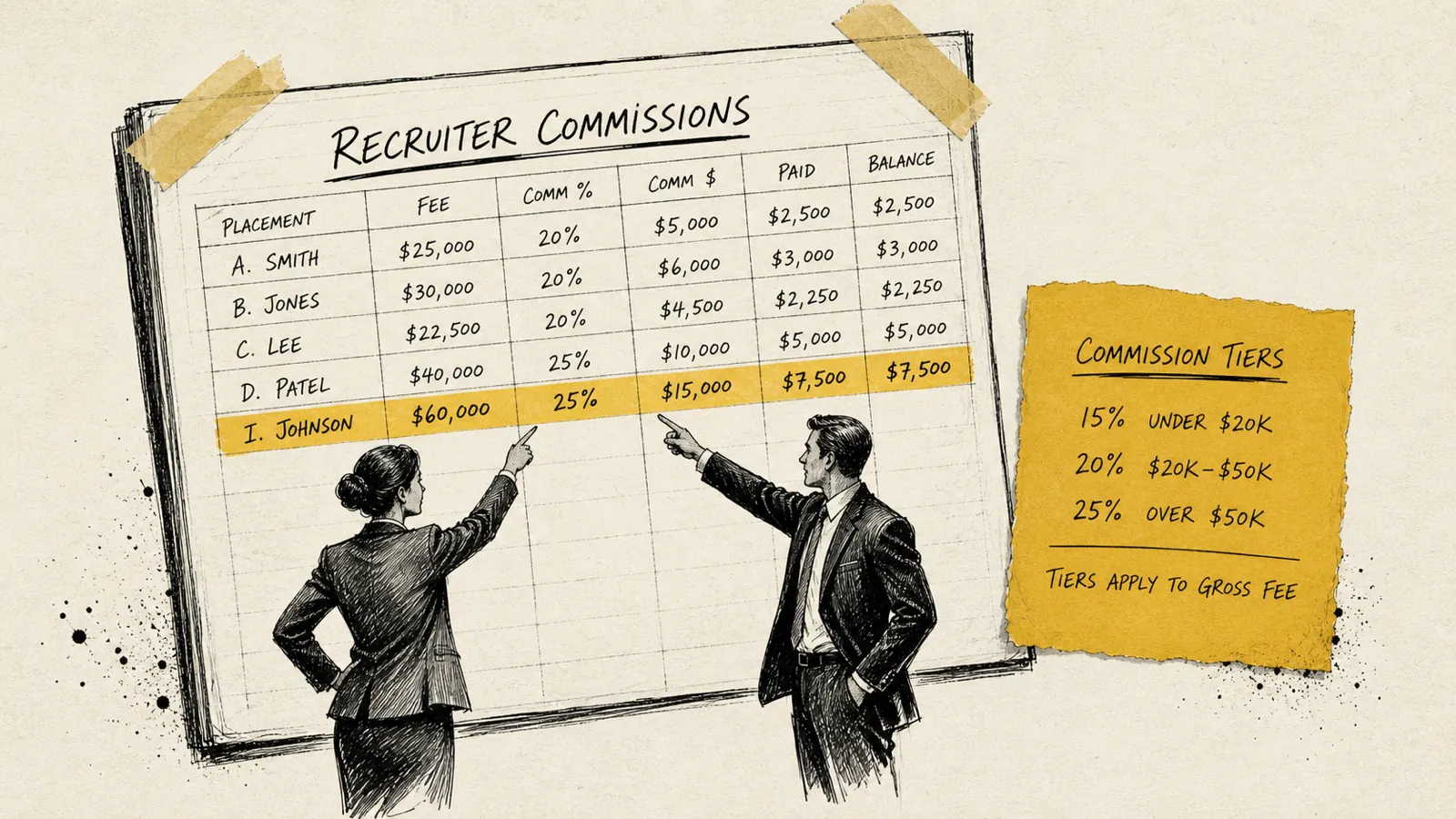
- Recruiter commission payroll: Variable supplemental pay tied to closed placements, often calculated from ATS data, deal sheets, or a commission spreadsheet. This is where most of the manual work lives, because someone has to translate "placement closed" into a dollar amount and get it into payroll before the cutoff.
- Placed contractor payroll: W-2 or 1099 payments to candidates you've placed on contract engagements at client sites. This stream requires you to also generate client invoices, track hours, and reconcile billable amounts against what you're paying out, creating a margin reconciliation layer that most payroll tools don't handle natively.
Understanding which of these three streams applies to your firm is the first step to designing the right integration. Perm-only firms have the simplest setup. Contract-heavy staffing firms have the most complex. Most recruiting firms sit somewhere in between.
The Core Integration Problem: Why Your Books Never Quite Match
The reason recruiting firm owners end up doing late-night reconciliation is almost always structural, not a result of sloppy bookkeeping. The data that drives your financials lives in three or four different places, and none of them were designed to talk to each other out of the box.
Here's what the broken version of this looks like in practice:
- A placement closes in Bullhorn, Crelate, or JobAdder. That data lives in your ATS.
- Someone calculates the recruiter's commission, often in a Google Sheet or Excel file, and emails it to whoever runs payroll.
- Payroll is processed in Gusto or Rippling, creating a payroll journal entry.
- That journal entry either syncs imperfectly to QuickBooks or gets exported as a CSV and manually uploaded.
- A client invoice is generated in QuickBooks, FreshBooks, or sometimes a separate invoicing tool.
- At month-end, reconciling the invoice revenue against the payroll costs requires pulling reports from every system and cross-referencing them by hand.
Each handoff in that chain is a place where data can go wrong: a mistyped amount, a commission processed in the wrong pay period, an invoice that doesn't match the placement record. Multiply that by 15 or 20 placements a month and you have a full-time reconciliation job masquerading as a part-time bookkeeping task.
Payroll Platform Options for Recruiting Firms: A Practical Comparison
Choosing the right payroll platform is the foundation of a clean integration. The good news is that the major platforms have all invested heavily in accounting integrations over the past five years. Here's how the main options compare for recruiting firm use cases.
Gusto
Gusto's native QuickBooks Online and Xero integrations are genuinely well-built: payroll journal entries sync automatically after each payroll run, employee records stay in sync, and tax payments are tracked in real time. For recruiting firms, Gusto's ability to handle both W-2 employees and 1099 contractor payments in a single platform is a significant operational advantage.
Where Gusto falls short for recruiting firms is in commission complexity. It handles supplemental pay well, but it doesn't have a native way to ingest placement data from an ATS and calculate commissions automatically. You'll still need a commission layer (whether that's a spreadsheet, a tool like QuotaPath, or a custom workflow) that feeds into Gusto before each payroll run.
Rippling
Rippling is the choice for recruiting firms that want payroll, HR, benefits, and IT device management in a single platform. Its integration ecosystem is broader than Gusto's: it connects to QuickBooks, Xero, NetSuite, and dozens of HR and ATS tools via native integrations and an API. For firms that are scaling past 15–20 internal employees or that want to automate onboarding workflows for newly placed contractors, Rippling's platform depth is worth the premium.
For accounting integration specifically, Rippling's general ledger sync is more configurable than Gusto's: you can map payroll cost centers, departments, and pay types to specific chart of accounts entries, which is valuable when you want to track recruiter commission costs separately from base salary costs in QuickBooks.
ADP Workforce Now and ADP Run
ADP is the enterprise-grade option and the default choice for staffing firms that have grown past $10M in revenue or that have complex multi-state compliance needs. ADP Run targets smaller firms and integrates with QuickBooks Desktop and QuickBooks Online, though the sync is less smooth than Gusto's native integration. ADP Workforce Now is built for larger operations and integrates with NetSuite, Sage, and other mid-market accounting platforms in addition to QuickBooks.
The tradeoff with ADP is complexity and cost: it does a lot, but it requires more setup time and often a dedicated HR or payroll administrator to manage effectively.
Paychex Flex
Paychex Flex sits between Gusto and ADP in terms of scale and complexity. It integrates with QuickBooks Online and Desktop, and its General Ledger Service allows reasonably flexible mapping of payroll data to accounting entries. Many recruiting firms use Paychex when they've outgrown Gusto but aren't ready for the operational overhead of ADP. Its contractor payment capabilities are solid, making it a reasonable choice for firms with a mix of W-2 and 1099 placements.
Accounting Software Integration: QuickBooks, Xero, and Beyond
The most important thing to understand about accounting integrations for recruiting firms is this: you are not going to replace QuickBooks or Xero, and you shouldn't try to. These are battle-tested platforms that your accountant, your bookkeeper, and your tax preparer already know. The goal is to make data flow into them automatically, not to work around them.
QuickBooks Online
QuickBooks Online is the accounting platform of choice for the majority of recruiting firms, and it has the richest integration ecosystem of any accounting platform at this price point. Every major payroll provider (Gusto, Rippling, ADP, Paychex) has a native or certified integration with QBO. When properly configured, these integrations push payroll journal entries to QuickBooks automatically after each payroll run, including the breakdown of gross wages, employer taxes, benefits deductions, and net pay.
For recruiting firms, the key configuration decision is how to map your payroll cost categories to your chart of accounts. You want recruiter base salaries, recruiter commissions, and placed contractor payroll to land in separate expense accounts so you can see your true cost structure. Most firms set this up once during initial integration and rarely have to touch it again.
Xero
Xero is popular among recruiting firms that were founded outside the US or that have international operations, and it has strong integrations with Gusto and Rippling. The Gusto-Xero integration in particular is well-regarded: it syncs payroll data cleanly and supports multi-currency for firms managing payments in multiple countries. If your firm is already on Xero, there's no reason to migrate: the integration options are already there.
QuickBooks Desktop
QuickBooks Desktop users face a more complicated integration path. Most modern payroll platforms have moved their deepest integrations to cloud-based accounting software, and QBD integrations often require manual CSV imports or a third-party connector like Zapier, Workato, or a purpose-built middleware. If your firm is still on QuickBooks Desktop and you're struggling with payroll integration, migrating to QuickBooks Online is worth serious consideration. The integration ecosystem alone is worth the switch for most firms.
Commission Payroll Integration: The Hardest Piece of the Puzzle
Commission calculation and commission payroll integration is the most underserved problem in recruiting firm back-office operations. It's the piece that no payroll platform handles end-to-end, and it's the piece that causes the most manual work.
Here's the data flow problem in plain terms: your ATS knows when a placement closed and what the deal value was. Your commission plan (which lives in your head, a PDF, or a spreadsheet) knows what percentage of that deal value the recruiter earns. Your payroll platform needs a dollar amount to process. Getting from step one to step three requires a calculation layer that most firms are currently doing manually in Excel or Google Sheets.
Commission Calculation Tools That Integrate With Payroll
- QuotaPath: A commission tracking platform that integrates with Salesforce, HubSpot, and several ATS platforms, calculates commission based on configurable plan rules, and exports approved payouts to Gusto, Rippling, and ADP. It's purpose-built for commission automation and is increasingly used by recruiting firms with complex split or tiered commission structures.
- Spiff (now Salesforce Spiff): Similar to QuotaPath in function, Spiff is better suited for larger recruiting firms or those already on Salesforce CRM. It handles multi-recruiter deal splits natively and has audit trail features that are valuable when recruiters question their commission calculations.
- Native ATS commission modules: Platforms like Bullhorn have built-in commission tracking that can generate commission reports, though most still require a manual step to move those amounts into payroll. Newer ATS platforms are building tighter payroll integrations, but true end-to-end automation from ATS placement to payroll processing remains rare.
- Custom spreadsheet workflows with Zapier: For smaller firms, a well-designed Google Sheet with a Zapier or Make (formerly Integromat) automation can pull placement data from your ATS, calculate commissions, and push approved amounts into Gusto or Rippling as supplemental pay line items. It's not elegant, but it works and costs very little to set up.
The commission integration gap is the number one source of payroll-related frustration for recruiting firms. The payroll-to-accounting sync is the part most platforms handle reasonably well. If you're going to invest time in one integration project, make it the commission calculation layer.
Contract Placement Payroll: W-2 and 1099 Flows Explained
If your firm places contractors (candidates who work on-site at a client but are paid by your firm) you have an additional layer of payroll complexity that perm-only firms don't face: the margin reconciliation problem.
The basic flow looks like this: your contractor works 40 hours at a client site. You bill the client at, say, $85/hour. You pay the contractor $60/hour. The $25/hour spread is your gross margin. Simple enough in concept, extraordinarily messy in practice when you're tracking it across 10, 20, or 50 active contractors using tools that weren't designed to connect to each other.
W-2 Contractor Payroll Integration
When your contractors are W-2 employees of your firm, they run through your standard payroll system. The integration challenge is connecting time-tracking data (from tools like TSheets, Deputy, or ClockShark) to your payroll platform so that hours flow automatically rather than being entered manually. Most major payroll platforms have native or third-party integrations with popular time-tracking tools. The secondary challenge is generating client invoices that match the timesheet data. This typically requires a bridge between your time-tracking tool and your accounting software.
1099 Contractor Payroll Integration
For 1099 contractors, the payroll flow is simpler from a tax perspective but often more fragmented from a data perspective. Platforms like Gusto, Rippling, and ADP all support 1099 contractor payments and handle the annual 1099-NEC filing. The integration gap is usually on the invoicing side: ensuring that the amounts you're paying contractors match the hours billed to clients, and that those invoice amounts land correctly in QuickBooks without manual re-entry.
Building Your Integration Stack: A Step-by-Step Architecture
The right integration architecture for your recruiting firm depends on your placement model, your current tools, and your tolerance for custom configuration versus out-of-the-box solutions. Here's a practical framework for building it.
Step 1: Audit Your Current Data Flows
Before touching any integrations, map out where your data currently lives and where the manual handoffs happen. Draw the line from "placement closes in ATS" to "financial data lands in QuickBooks" and mark every point where a human is currently moving data by hand. Those are your integration targets.
Step 2: Standardize Your Chart of Accounts
A clean integration requires a clean chart of accounts in QuickBooks or Xero. At minimum, you should have separate accounts for recruiter base salaries, recruiter commissions, placed contractor labor costs, employer payroll taxes, and client invoice revenue. If these are all lumped together, your integrations will push data to the right place but your reporting will still be opaque.
Step 3: Configure Your Payroll-to-Accounting Integration
Set up the native integration between your payroll platform and your accounting software. For Gusto-to-QuickBooks Online, this takes roughly 30–60 minutes to configure correctly. The key decisions are which QuickBooks accounts each payroll line item maps to, and whether you want to sync at the summary level (one journal entry per payroll run) or at the employee level (individual entries per employee). For most recruiting firms, summary-level sync is sufficient and easier to manage.
Step 4: Build or Buy Your Commission Layer
Decide whether you're going to use a dedicated commission tool like QuotaPath or Spiff, build a Google Sheets workflow with automation, or invest in an ATS with stronger commission capabilities. The right answer depends on the complexity of your commission plans and how many recruiters you're managing. Firms with straightforward single-tier commission plans can often manage with a well-designed spreadsheet workflow. Firms with tiered plans, split commissions, or draw-against-commission structures will benefit from a dedicated tool.
Step 5: Connect Time Tracking to Payroll (Contract Firms Only)
If you run contractors, integrate your time-tracking tool directly with your payroll platform. Most major time-tracking tools have native integrations with Gusto, Rippling, and ADP. Test the integration with a single contractor before rolling it out broadly, and confirm that the hours syncing to payroll match exactly what you'd bill the client.
Step 6: Automate Client Invoice Generation
The final piece, and the one most firms neglect, is automating the creation of client invoices from placement or timesheet data. For perm firms, this means creating a QuickBooks invoice automatically when a placement is marked closed in your ATS. For contract firms, it means generating weekly or bi-weekly invoices from approved timesheet data. Tools like Zapier, Make, or purpose-built recruiting back-office platforms can bridge this gap.
Common Integration Mistakes Recruiting Firms Make
Even well-intentioned integration projects go wrong. Here are the most common mistakes to avoid.
- Syncing at the wrong level of detail: Pushing payroll data to QuickBooks as a single lump sum rather than broken out by pay type means you can't see your commission costs separately from salaries, a common setup error that undermines your reporting before it begins.
- Ignoring the commission timing mismatch: Commissions earned in month A but paid in month B can create significant accrual issues if your accounting is on an accrual basis. Make sure your integration accounts for when commissions are earned versus when they're paid, and confirm with your accountant how you should be booking them.
- Setting up the integration and never testing it: The first three payroll runs after a new integration go live should be manually verified against your accounting entries line by line. Most integration errors are caught in this period and are easy to fix if caught early.
- Using QuickBooks Desktop with modern payroll tools: The integration ecosystem for QuickBooks Desktop is years behind QuickBooks Online. If you're struggling with sync issues on QBD, the problem is often the platform itself, not the configuration.
- Not mapping contractor payments to the correct cost accounts: Contractor labor costs should be tracked separately from internal employee costs in your chart of accounts. Mixing them together makes gross margin analysis by placement type impossible.
- Skipping the invoice reconciliation step: Even with a clean payroll-to-accounting sync, many firms still manually reconcile client invoices at month-end because they never automated the invoice generation side. The payroll integration is only half the loop. The invoice side needs to close it.
What a Fully Integrated Recruiting Firm Back Office Looks Like
Let me paint the picture of what you're building toward, because it's worth being concrete about the destination.
In a fully integrated recruiting firm back office, the flow looks like this: a recruiter closes a placement in Bullhorn or Crelate. That triggers a workflow that calculates the commission based on your plan rules, creates a draft commission entry for approval, and queues a client invoice in QuickBooks. When you approve payroll, the commission entry moves to Gusto as supplemental pay. After the payroll run processes, Gusto automatically pushes the journal entry to QuickBooks, categorized correctly by pay type and cost center. The client invoice was already generated and sent. At month-end, your bookkeeper pulls a P&L in QuickBooks and the numbers are clean: no late-night reconciliation, no mystery discrepancies, no spreadsheet archaeology.
That's not a fantasy. Recruiting firms billing $3M to $20M are operating this way today. The technology exists and the integrations exist.
Integration Costs: What Should You Actually Expect to Pay?
One of the most common hesitations recruiting firm owners have about integration projects is cost uncertainty. Here's a realistic breakdown.
Payroll platform costs: Gusto ranges from roughly $40–$80 per month base plus a per-employee fee. Rippling starts around $35 per month per employee for the full platform. ADP and Paychex pricing is quote-based but typically higher. These are costs you're likely already paying.
Commission tool costs: QuotaPath and Spiff are typically priced per user per month, ranging from $20–$65 per user depending on plan tier. For a firm with 5–10 recruiters, that puts the annual cost at $1,200–$4,000.
Integration middleware costs: If you use Zapier or Make to connect systems that don't have native integrations, expect $50–$200 per month depending on the volume of automation runs you need.
Setup and configuration: If you hire a QuickBooks ProAdvisor to set up your integrations, that is a one-time project cost rather than a recurring one. What you pay depends on how complex your stack is, so get a quote before you commit.
Choosing the Right Integration Partner or Consultant
Not every recruiting firm owner wants to build these integrations themselves, and they shouldn't have to. There's a growing ecosystem of bookkeepers, fractional CFOs, and back-office consultants who specialize in recruiting firm operations and understand the nuances of commission payroll, contractor margin tracking, and ATS-to-accounting data flows.
When evaluating an integration partner, look for someone who has worked specifically with recruiting or staffing firms, not just generic small business accounting. The commission and contractor complexity is sufficiently unique that a generalist QuickBooks consultant may not be familiar with the right account mapping structure or the specific integration quirks of your ATS.
Questions to ask any integration consultant before hiring them:
- Have you set up payroll integrations for other recruiting or staffing firms specifically, and can you provide a reference?
- How do you handle commission timing and accrual in the QuickBooks setup: do you book commissions when earned or when paid, and why?
- What's your approach to contractor margin tracking: do you set up a separate cost account for contractor labor, and how does that connect to the client invoice side?
- What happens when the payroll sync fails or creates a duplicate entry: what's your monitoring and error-correction process?
The Future of Recruiting Firm Payroll Integration
The trajectory is clear: the gap between ATS data, payroll, and accounting is closing. Platforms like Rippling are aggressively expanding their integration ecosystems. ATS vendors like Bullhorn are investing in their financial workflow capabilities. And a new generation of recruiting-specific back-office platforms is emerging that treats the perm placement, the contractor margin, and the internal recruiter commission as first-class objects in a unified financial workflow.
AI-assisted reconciliation is also becoming real: tools that can flag when an invoice amount doesn't match a placement record, or when a commission payout appears inconsistent with the underlying deal data, are moving from prototype to production. For recruiting firm owners, this means the manual reconciliation work that currently falls to you or your office manager is increasingly automatable.
The firms that invest in clean integration architecture today, even if it's imperfect, will have a significant operational advantage as these tools mature. Building on a clean data foundation is infinitely easier than trying to retrofit automation onto a fragmented, manual back office.
Frequently Asked Questions About Recruiting Firm Payroll Integration
Does QuickBooks integrate with Gusto for recruiting firms?
Yes. Gusto has a native, certified integration with QuickBooks Online that syncs payroll journal entries automatically after every payroll run. For recruiting firms, you can configure the mapping to separate commission payroll costs from base salary costs, which is important for understanding your true recruiter cost structure.
How do recruiting firms handle commission payroll integration?
Commission integration requires a calculation layer between your ATS or CRM and your payroll platform. Most recruiting firms currently use a spreadsheet for this, but dedicated tools like QuotaPath or Spiff can automate the calculation and push approved commission amounts directly to Gusto or Rippling as supplemental pay. The output then syncs to QuickBooks via the standard payroll integration.
What is the best payroll software for a recruiting firm?
For recruiting firms under $5M in revenue, Gusto offers the best combination of ease of use, accounting integrations, and pricing. Rippling is the stronger choice for firms that want unified HR, IT, and payroll, or that are scaling past 15 internal employees. ADP and Paychex are better suited for larger firms with complex multi-state compliance needs.
Can I integrate Rippling with QuickBooks for my recruiting firm?
Yes. Rippling has a native integration with QuickBooks Online that supports configurable general ledger mapping, allowing you to push payroll costs to specific expense accounts by department, cost center, or pay type. This is particularly useful for recruiting firms that want to track commission costs, base salary costs, and contractor payroll costs in separate QuickBooks accounts.
How do I track contractor payroll margins in QuickBooks?
Set up a dedicated expense account in QuickBooks for contractor labor costs, separate from your internal employee payroll. When contractor payroll runs through Gusto, Rippling, or ADP, map those payments to the contractor labor account. Create client invoices for the billable amount of each contractor engagement. Your gross margin per contractor is then visible in QuickBooks as the difference between the client invoice revenue and the contractor labor expense for that period.
Next Steps: Where to Start
If you've read this far, you know what the problem is and what the solution looks like. The question is where to begin. Here's the honest answer: start with the integration that will save you the most time in the next 30 days.
For most recruiting firms, that's the payroll-to-QuickBooks sync: getting Gusto or Rippling pushing journal entries automatically instead of CSV uploads or manual entries. It's a two-hour setup project with immediate, recurring payoff.
Once that's stable, tackle the commission layer. That's where the most time is buried, and it's where errors are most costly, both financially and in terms of recruiter trust.
After that, if you run contractors, build the time-tracking-to-invoice bridge. At that point, your back office is running largely on autopilot, and the late-night reconciliation sessions become a thing of the past.
If you want a second set of eyes on your current setup or help mapping out the right integration architecture for your specific firm, that's exactly what we do at CollectedHQ. The goal isn't to sell you more software. It's to make sure the software you already have is actually working for you.

Never sweat invoicing or commissions again.