
Using Xero in Your Recruiting Firm: Setup, Invoicing, Placement Tracking, and Automation for Search and Staffing Agencies

Key Takeaways
- Xero is a strong accounting foundation for recruiting firms, but it requires deliberate setup, especially your chart of accounts, to reflect how placement revenue, retainers, and contingency fees actually flow through your business.
- The biggest time drain for most recruiting firm owners is duplicate data entry: placements close in the ATS, then someone manually re-enters invoice details into Xero. Fixing this with integrations or automation removes the re-entry step.
- Xero handles invoicing and basic reporting well, but it does not natively track recruiter-level placement activity, deal stage timing, or commission splits. Those require either a connected ATS or a tool like CollectedHQ sitting between your systems.
- Retained search firms and contingency firms have meaningfully different Xero setups: retained firms need milestone billing and deferred revenue handling, while contingency firms need clean placement-to-invoice workflows and falloff tracking.
- Before you automate anything, clean up your Xero chart of accounts, standardize your invoice line items, and decide how you want to track gross margin by recruiter or by practice area. The structure you build now determines the reporting you can trust later.
A placement closes in the ATS. Then someone at your firm opens a spreadsheet to calculate the invoice amount, cross-references the client contact details, types it into Xero, and hopes the numbers match what the ATS says. Every time.
This is the quiet operational tax that almost every Xero recruiting firm owner pays. Not because Xero is bad software. It isn't. But because no one ever set it up specifically for how a search or staffing agency actually operates. And the gap between how Xero works out of the box and how your firm actually bills clients is where hours disappear every week.
This guide fixes that. We'll cover exactly how to configure Xero for a recruiting or executive search firm, how to build invoicing workflows that don't require manual re-entry, how to handle the meaningful differences between contingency and retained search billing, and how to connect your ATS so your books reflect reality without a midnight reconciliation session.
Why Recruiting Firms Choose Xero (And Where It Falls Short)
Xero is one of the two dominant cloud accounting platforms for small-to-mid-size businesses, alongside QuickBooks Online. For recruiting firms specifically, Xero tends to attract owners who want a cleaner interface, more flexible invoice customization, and stronger international multi-currency support, which matters for firms placing across borders or billing in GBP, AUD, CAD, or EUR alongside USD.
The platform handles the core accounting functions a recruiting firm needs: invoicing, bank feeds, reconciliation, payroll (via integrations), accounts receivable aging, and financial reporting. Its app marketplace includes hundreds of integrations, several of which are directly relevant to staffing and search.
Where Xero falls short for recruiting firms is in business-specific context. Xero does not know what a placement is. It does not know the difference between a contingency fee and a retainer. It cannot tell you which recruiter generated which revenue, how long a search took from kickoff to close, or what your falloff rate is doing to your realized revenue. Those gaps are real, and they're why so many firm owners end up layering spreadsheets on top of their accounting system.
The good news: these gaps are solvable with the right setup and the right integrations. That's exactly what this guide covers.
Setting Up Xero for a Recruiting Firm: Chart of Accounts That Actually Reflects Your Business
The chart of accounts is the skeleton of your financial reporting. Get it wrong and every report you pull from Xero will be technically accurate but practically useless. Get it right and you'll have clean gross margin data, clear expense visibility, and financial statements you can actually hand to a buyer, a banker, or your accountant without embarrassment.
Firms that set up Xero themselves often inherit Xero's default chart of accounts and never revisit it. The result: all revenue gets lumped into a single "Sales" account, all contractor costs hit one expense line, and there's no way to separate contingency revenue from retained fees or temp margin from direct hire fees.
Here's how to structure it properly.
Revenue Accounts to Create
- Contingency Placement Fees: Direct hire fees earned on a no-fill, no-fee basis; this is your core revenue line if you run a contingency desk.
- Retained Search Fees: Fees from engaged search mandates, which will often flow through milestone billing; keep this separate from contingency so you can track close rates and revenue mix over time.
- Temp/Contract Staffing Revenue (Bill Rate): The gross bill rate revenue from temporary or contract placements; you'll want a corresponding COGS account for contractor pay to calculate temp margin cleanly.
- Temp/Contract Mark-Up Revenue: Some firms prefer to record only the mark-up portion as revenue rather than gross bill rate; choose one method and be consistent, or your gross margin percentages will be meaningless.
- Recruiting Retainer / Engagement Fees: Non-refundable engagement fees charged upfront before work begins; these are distinct from retained search milestone payments and should be recognized differently.
- Ancillary Services Revenue: Background check pass-throughs, candidate assessment fees, outplacement services, or RPO management fees that don't fit neatly into placement fees.
Cost of Revenue / COGS Accounts
- Contractor / Temp Employee Pay: The payroll cost for workers you place on a contract basis; this is your primary COGS if you run a staffing or contract desk.
- Recruiter Commission: Placement-Based: The variable commission paid to internal recruiters on closed placements; separating this from base salary lets you calculate true gross margin per deal.
- Employer Taxes on Contract Workers: FICA, FUTA, SUTA, and workers' comp costs associated with W-2 contractors you employ; these belong in COGS, not operating expenses.
Operating Expense Accounts Worth Separating
- ATS / CRM Software: Bullhorn, Vincere, JobAdder, Loxo, Crelate, or whatever system you use; a separate line makes benchmarking and vendor reviews easier.
- Job Board and Sourcing Tools: LinkedIn Recruiter, Indeed, ZipRecruiter, SeekOut, and similar platforms; this is often a firm's largest non-payroll operating expense and deserves its own line.
- Recruiter Base Salaries and Benefits: Separated from commission-based comp so you can model your fixed cost base accurately.
- Marketing and Business Development: Outreach tools, content marketing, events, and BD-related spend.
Setting up tracking categories in Xero is equally important. Use tracking categories to segment revenue and expenses by practice area (e.g., Technology, Finance, Healthcare) or by recruiter/team. This is how you get to profitability reporting by desk without buying additional software.
Xero Invoicing for Recruiting Firms: Contingency, Retained, and Contract Billing
Invoicing in Xero is genuinely good: flexible, customizable, and automatable in ways that most firm owners never explore. The key is building invoice templates and workflows that match your specific billing model, because contingency firms, retained search firms, and staffing agencies each have materially different invoicing needs.
Contingency Fee Invoicing
A contingency placement invoice is conceptually simple: candidate starts, fee is earned, invoice goes out. In practice, the friction comes from the calculation. Your fee is typically a percentage of first-year base compensation, set in the client agreement.
The problem: that calculation happens in your ATS when the deal closes, and then someone has to manually recreate it as a Xero invoice. That's the duplicate entry problem. We'll address the fix in the integrations section below.
For contingency invoices in Xero, standardize your line item descriptions. Something like: "Executive Search Placement Fee: [Candidate Name], [Title], [Start Date], [Fee %] of $[Base Salary]". Verbose, yes. But when a client's AP department questions an invoice six weeks after the fact, that description saves a support call.
Also: set your payment terms explicitly. Net 15 is standard for most contingency search firms; Net 30 is common for larger enterprise clients. Whatever you agree to, make it the default on that client's contact record in Xero so every invoice inherits it automatically.
Retained Search Milestone Billing
Retained search billing is where Xero's invoicing flexibility earns its keep, and where the most common accounting mistakes happen. Retained search fees are typically structured as three equal payments: one-third on engagement, one-third at candidate presentation or shortlist, and one-third at placement or candidate start.
Each milestone payment has a different revenue recognition implication. The first payment (engagement fee) is often considered partially earned immediately but partially deferred until work is delivered. The second and third payments are clearly earned at the time of the milestone. If your firm operates on accrual accounting, which any firm doing more than $1M in annual revenue almost certainly should, those deferred portions belong in a liability account until earned.
In Xero, handle this by:
- Creating a Deferred Revenue account (a current liability) in your chart of accounts.
- When a retainer payment is received before the milestone is complete, record it as a credit to Deferred Revenue, not to your Retained Search Fees revenue account.
- When the milestone is hit, journal it from Deferred Revenue to Retained Search Fees revenue.
- Use Xero's draft invoice feature to pre-stage milestone invoices at the time of engagement so nothing slips through the cracks as the search progresses.
This is one of those areas where a bookkeeper or fractional CFO who understands recruiting firm accounting is worth finding. Misclassifying retained payments is one of the most common errors. It distorts monthly revenue, makes performance months look better or worse than they are, and creates headaches at tax time.
Contract and Temp Staffing Invoicing
Contract staffing invoicing in Xero requires a different setup entirely. You're billing weekly or bi-weekly based on hours worked, at a defined bill rate per contractor per client. Volume compounds quickly: a firm with 20 contractors on billing generates 40+ invoices per month, and each one needs to tie back to a timesheet.
Xero's repeating invoice feature handles the cadence, but it doesn't handle timesheet-based variable amounts natively. Most staffing firms running contract desks either use a dedicated staffing platform (like Bullhorn, TempWorks, or Avionte) that pushes invoices into Xero, or they use Xero's API via a middleware tool to automate the calculation and invoice creation based on approved timesheets.
Connecting Your ATS to Xero: Eliminating the Duplicate Entry Problem
The biggest improvement most recruiting firms can make to their Xero setup is eliminating the manual handoff between their ATS and their accounting system. When a placement closes in Bullhorn, Vincere, JobAdder, or Loxo, the deal data (candidate name, client, fee amount, start date, billing contact) should flow directly into Xero as a draft or approved invoice, not into a spreadsheet that someone then re-keys by hand.
The integration landscape for ATS-to-Xero connectivity has matured significantly. Here's how the major platforms connect:
Bullhorn + Xero
Bullhorn has a native Xero integration available through the Bullhorn Marketplace. It can push invoices from Bullhorn's billing module directly into Xero, sync client/contact records, and handle both direct hire and contract billing workflows. The native integration works well for firms that do their billing inside Bullhorn; it's less useful for firms that prefer to generate invoices in Xero directly.
Vincere + Xero
Vincere (popular with executive search and mid-size staffing firms, particularly outside North America) has a direct Xero integration that's genuinely well-built. Placement data, fee amounts, and client details sync in near-real-time, and the mapping between Vincere deal stages and Xero invoice status is configurable. For firms on Vincere, this integration alone can eliminate most of the manual invoicing work.
JobAdder + Xero
JobAdder includes a native Xero integration that pushes placement invoices automatically when a job is marked as placed. It's straightforward and reliable for contingency billing, though retained search milestone billing requires some manual workflow discipline on the JobAdder side to trigger correctly.
Loxo, Crelate, Recruiterflow, and Others
For ATS platforms without native Xero integrations, Zapier and Make (formerly Integromat) can bridge the gap. You build an automation that watches for a deal-won event in the ATS and creates a Xero invoice draft with the mapped fields. This requires some setup time but works reliably once built.
CollectedHQ as the connective layer
For firms that want placement tracking, commission calculations, and financial reporting that live between the ATS and Xero rather than inside either one, tools like CollectedHQ sit in the middle, pulling placement data from your ATS, calculating commission splits, reconciling against Xero invoices, and surfacing the financial metrics that neither system shows you on its own. This is particularly valuable for firms with complex commission structures or multiple recruiters sharing credit on deals.
Tracking Recruiter Commissions and Placement Revenue in Xero
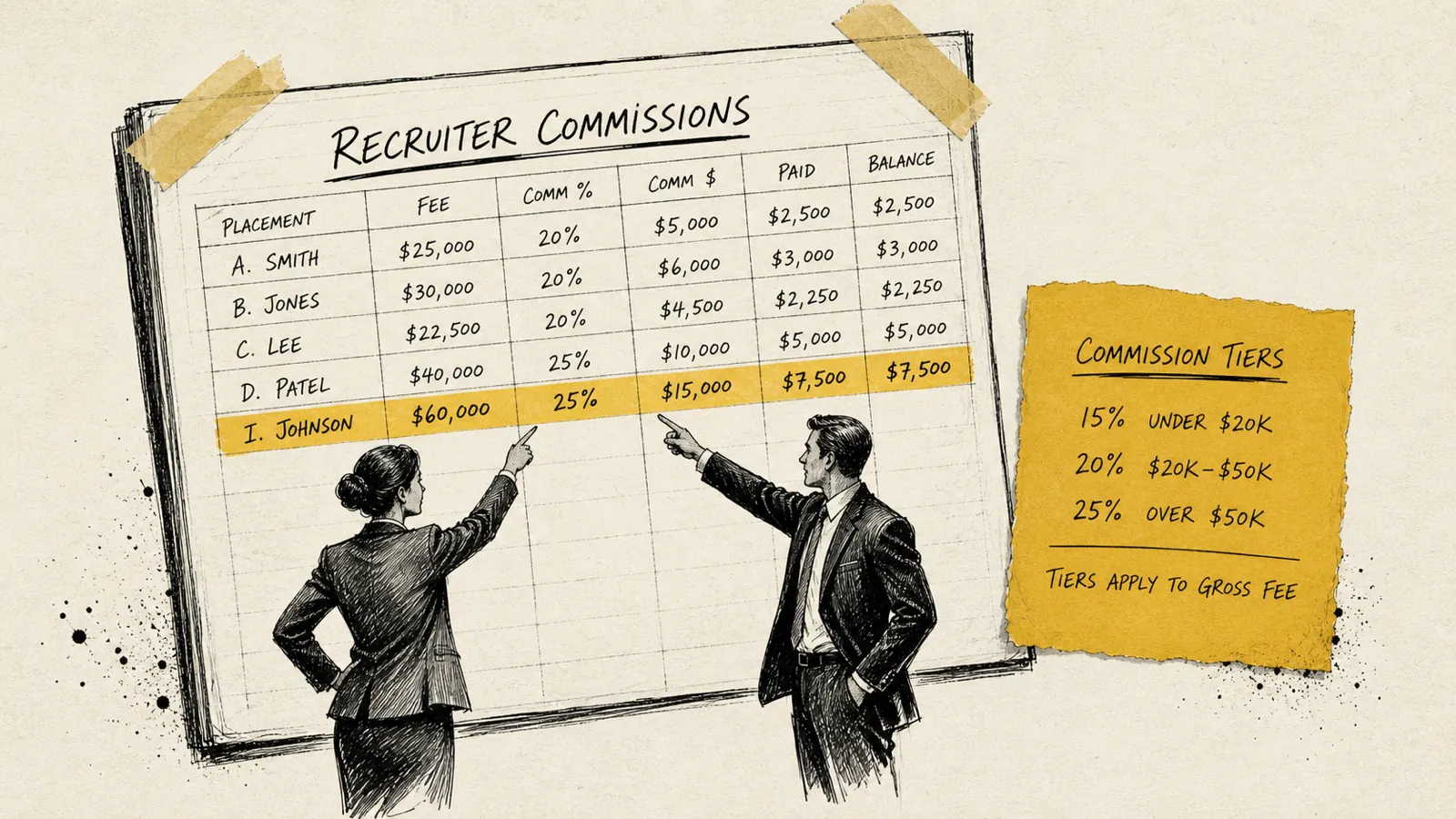
Xero does not natively calculate recruiter commissions. This surprises many firm owners who assume their accounting system should handle this. It's a reasonable assumption, but Xero is a general ledger, not a compensation management tool, and it has no concept of commission tiers, split deals, or rollback provisions for falloffs.
The most common approaches recruiting firms use to track commission in conjunction with Xero:
- Spreadsheet + Xero manual entry: The owner or office manager maintains a commission spreadsheet (often in Google Sheets or Excel) that references closed deals, calculates splits, and produces a monthly commission report. The totals are then entered as a journal entry or bill in Xero. This works at low volume and breaks down as placement volume grows.
- ATS commission module + Xero sync: Some ATS platforms (Bullhorn, Vincere, and others) have built-in commission tracking that can export or sync commission payable amounts to Xero as bills or payroll line items. This is cleaner but requires that your commission rules be accurately modeled inside the ATS, which many firms never complete.
- Dedicated commission tool + Xero integration: Platforms designed specifically for recruiter compensation, including CollectedHQ, calculate commission splits automatically based on deal data from the ATS, then push the payable amounts to Xero as approved bills or payroll inputs. This eliminates the spreadsheet entirely and creates an auditable commission record that both recruiters and owners can reference.
Whichever method you use, the goal is the same: commission expenses should hit Xero in the same accounting period as the related placement revenue. Mismatched timing distorts your gross margin by month and makes it impossible to know whether a good revenue month was actually profitable.
Handling Falloffs and Fee Refunds
Falloffs (placements where the candidate leaves or is terminated within the guarantee period, triggering a partial or full fee refund) are the silent margin killer for contingency recruiting firms. Many firms handle falloffs inconsistently in Xero, which creates both accounting errors and cash flow surprises.
The correct Xero treatment for a falloff depends on whether you're issuing a cash refund or a credit toward a replacement search:
- Cash refund: Issue a credit note in Xero against the original invoice, applied to the refund amount. The credit reduces revenue in the current period. If the original invoice was in a prior period that's already been reported, work with your accountant on whether to restate or record in the current period.
- Replacement search credit: Record the credit note against the original invoice and create a new engagement record. The replacement fee, when earned, is new revenue. It doesn't offset the credit note directly unless you choose to net them for client-facing simplicity.
- Commission clawback: If your commission structure includes clawback provisions for falloffs, the commission reversal should be recorded in the same period as the revenue reversal to keep your gross margin clean.
Xero Reporting for Recruiting Firms: The Metrics That Matter
Xero's reporting suite is solid for standard financial statements: P&L, balance sheet, cash flow, accounts receivable aging. For recruiting firms, though, the metrics that actually drive decisions are operational: revenue per recruiter, average fee size, days to invoice, collection rate by client, gross margin by practice area.
Some of these you can get directly from Xero with the right setup. Others require a layer on top.
What Xero Can Show You Directly
- Revenue by tracking category: If you've set up tracking categories by practice area or recruiter, Xero's P&L by tracking category report gives you revenue and gross margin by segment.
- Accounts receivable aging: Critical for recruiting firms, where clients often pay slowly. Xero's AR aging report shows outstanding invoices by age bucket (current, 30, 60, 90+ days) and by client.
- Cash flow by month: Useful for spotting the lag between when you earn fees and when cash actually arrives.
- Invoice history by client: Helpful for business development; you can see total billings by client over any time period to identify your most valuable client relationships.
What You'll Need to Supplement
- Revenue per recruiter: Xero doesn't know which recruiter generated which placement unless you've assigned tracking categories at the invoice line level, which most firms don't do consistently.
- Average days to fill / time-to-placement: This is ATS data, not accounting data. Xero can tell you when the invoice was created but not when the search started.
- Pipeline-weighted forecast: Xero is a trailing system; it records what happened, not what's likely to happen. Deal-weighted revenue forecasting lives in your ATS or in a planning tool.
- Gross margin by deal: Possible in Xero if you create projects or track COGS at the invoice level, but most recruiting firms don't bother, which means they lose visibility into which types of searches are actually most profitable.
Xero vs. QuickBooks for Recruiting Firms: Choosing the Right Foundation
The Xero vs. QuickBooks Online question comes up constantly among recruiting firm owners, and the honest answer is that both platforms are capable of supporting a well-run recruiting firm. The difference is in the details of how you work and what integrations you rely on.
Choose Xero if:
- You bill clients in multiple currencies (Xero's multi-currency support is genuinely superior to QBO at most plan levels).
- Your firm operates in or bills clients in the UK, Australia, New Zealand, or Canada, where Xero has deeper market presence and local banking integrations.
- Your ATS of choice (Vincere, JobAdder, and several others) has a stronger native Xero integration than a QuickBooks one.
- You prefer Xero's cleaner UI and find QuickBooks cluttered. This sounds superficial but matters when your office manager uses it daily.
Stick with QuickBooks if:
- Your accountant or bookkeeper primarily works in QuickBooks and knows it well. Not the time to migrate.
- You're on Bullhorn and your billing workflow is already connected to QuickBooks via an existing integration.
- You rely on QuickBooks Payroll and migrating would disrupt your payroll process, which is a real cost and not worth the switch for accounting software alone.
The platform matters less than the setup. A properly configured Xero or QuickBooks instance, connected to your ATS and supported by clean workflows, will outperform a poorly configured version of either platform every time.
Automating Your Recruiting Firm's Finance Stack: Beyond Basic Xero
For recruiting firms doing more than $1M in annual revenue, Xero alone, even well-configured Xero, starts to show its limits. The firms that operate most efficiently treat Xero as the accounting system of record but layer purpose-built tools on top for the recruiting-specific work.
A modern recruiting firm finance stack typically looks something like this:
- ATS (Bullhorn, Vincere, JobAdder, Loxo, etc.): Source of truth for placements, deals, candidates, and client relationships. Deal data originates here.
- Placement/commission management layer (CollectedHQ or similar): Sits between the ATS and accounting system; tracks placement revenue by recruiter, calculates commission splits, handles falloff adjustments, and provides operational financial reporting the ATS and Xero can't generate alone.
- Xero: Accounting system of record for invoicing, receivables, payables, payroll inputs, and financial statements. Receives clean data from the layers above rather than requiring manual entry.
- Bank feeds + reconciliation (Xero native): Xero's bank feed feature automatically imports transactions from connected business accounts daily, and its reconciliation matching is reliable enough to reduce monthly close time significantly.
- Accounts receivable follow-up (Chaser, Paidnice, or similar): Xero integrates with AR automation tools that send automated payment reminders on overdue invoices, which is particularly valuable for recruiting firms where large invoices sometimes get deprioritized in client AP queues.
Firms that invest in connecting these layers, even imperfectly, spend less time on financial operations than firms that rely on manual processes, and they have better data to make decisions with.
Common Xero Mistakes Recruiting Firms Make (And How to Fix Them)
These are common patterns in how recruiting firms use Xero. Each one is fixable, but left unaddressed, each one costs real money or time.
Mistake 1: Using a single revenue account for all fee types.
When contingency fees, retained fees, contract mark-up, and engagement fees all land in one "Sales" account, you lose the ability to track revenue mix, compare margins across fee models, and understand which part of your business is growing. Fix: restructure your revenue accounts as described in the chart of accounts section above.
Mistake 2: Recording retainer payments as earned revenue immediately.
If you're on accrual accounting and you record a $30,000 first-third retainer as revenue the day the check clears, before you've completed the milestone, your revenue is overstated and your financial statements are inaccurate. Fix: use a deferred revenue liability account and recognize revenue milestone by milestone.
Mistake 3: Not using Xero's tracking categories.
Tracking categories are one of Xero's most useful features for recruiting firms, and most firms never turn them on. Without tracking categories, your P&L is a single-column document. With them, you can cut it by practice area, geography, or recruiter team and see where you're actually making money. Fix: add two tracking categories (Practice Area and Team/Recruiter) and apply them consistently to every invoice line item.
Mistake 4: Mixing commission expense with base salary expense.
When variable commissions and fixed salaries are in the same expense account, you can't calculate gross margin on placements or understand your true variable cost per deal. Fix: create separate Xero accounts for recruiter base compensation and recruiter commission/variable pay, and book each to the correct account at payroll time.
Mistake 5: Never reconciling the ATS and Xero.
If your ATS says you closed 8 placements last month and Xero shows 7 invoices sent, one deal slipped through. That is pure revenue leakage. Fix: run a monthly reconciliation between closed placements in your ATS and invoices issued in Xero. A tool like CollectedHQ automates this reconciliation and flags discrepancies automatically.
Getting Your Recruiting Firm's Xero Setup Right: A Practical Starting Point
If you're starting from scratch or cleaning up an existing Xero instance, here's the sequence that works:
- Audit and restructure your chart of accounts: separate revenue types, create COGS accounts for contractor pay and placement commissions, and add the operating expense lines that matter for your firm.
- Set up tracking categories: at minimum, one for practice area or division and one for recruiter or team. Apply them to new invoices immediately and backfill key accounts as time allows.
- Standardize your invoice templates: create Xero invoice templates for each fee type (contingency, retained milestone 1/2/3, contract weekly) with standard line item descriptions and correct revenue account mapping.
- Connect your ATS: identify whether a native integration exists between your ATS and Xero and set it up. If not, build a Zapier or Make automation to push placement data to Xero on deal close. Budget a few hours for this.
- Build a falloff and credit note workflow: document exactly how your team handles falloffs in Xero so it's consistent, not dependent on whoever happens to process it.
- Set up AR automation: connect a tool like Chaser or Paidnice to Xero to send automated payment reminders on overdue invoices. Recruiting firm invoices are large and clients sometimes let them age; automated reminders improve collection times without requiring staff attention.
- Establish a monthly close checklist: reconcile ATS placements to Xero invoices, confirm all commission expenses hit the right period, review AR aging, and pull a P&L by tracking category.
None of this requires a full-time accountant to implement. It requires clarity about how your firm makes money and a few hours to configure Xero to reflect that. The payoff (in time saved, in financial visibility, in confidence that your books are accurate) compounds every month going forward.
Frequently Asked Questions: Xero for Recruiting Firms
Is Xero good for recruiting firms?
Xero is a solid accounting foundation for recruiting firms of all sizes. It handles invoicing, bank reconciliation, and financial reporting well. Its main limitation is that it does not natively track recruiter-level activity, placement pipelines, or commission splits. Those require integration with an ATS or a purpose-built tool like CollectedHQ sitting between your systems.
How should a recruiting firm set up its chart of accounts in Xero?
Recruiting firms should create separate revenue accounts for contingency fees, retained search fees, temp/contract staffing revenue, and ancillary services. On the expense side, separate accounts for recruiter commissions, contractor payroll, job board spend, and ATS subscriptions give you clean gross margin visibility by revenue type. Tracking categories add another layer of segmentation by practice area or recruiter team.
Can Xero integrate with recruiting ATS platforms?
Xero integrates directly or via middleware (Zapier, Make, or native connectors) with many ATS platforms including Bullhorn, JobAdder, Vincere, and Loxo. The depth of integration varies. Some push invoices automatically on placement, others sync contact and company data only. For ATS platforms without native Xero connectors, Zapier automations can replicate most of the core workflow.
How do retained search firms handle milestone billing in Xero?
Retained search firms should stage milestone invoices as drafts at engagement kickoff and release each one when the corresponding milestone is hit. Retainer payments received before a milestone is complete should be recorded as deferred revenue (a current liability) and recognized as revenue only when the work is delivered. This keeps your financial statements accurate and your revenue recognition defensible.
What's the best way to track recruiter commissions in Xero?
Xero does not calculate commissions natively. The cleanest approach is to use a dedicated commission tracking layer (whether an ATS commission module or a tool like CollectedHQ) that calculates splits based on placement data and pushes approved commission amounts to Xero as bills or payroll inputs. This eliminates spreadsheet-based commission tracking and ensures commission expenses hit the same period as the related placement revenue.
Should I switch from QuickBooks to Xero for my recruiting firm?
Only if there's a specific reason that justifies the migration cost: typically multi-currency needs, a better native ATS integration on the Xero side, or a meaningful preference from your bookkeeper or accountant. If QuickBooks is working and your team knows it, the switching cost (time, migration risk, retraining) is rarely worth the marginal difference between the two platforms for a recruiting firm.

Never sweat invoicing or commissions again.